
St. Matthews, KY · Jefferson County
Solicitor Registration Application
This application collects personal, residence, employment, and solicitation details from people seeking a solicitor registration certificate from the City of St. Matthews.
- licensed online notary
- ~15 min average
- Notarized PDF emailed
What you’ll need
- Government-issued photo ID
- Webcam-enabled device (laptop or phone)
- This form, ready to upload as a PDF
What this form is
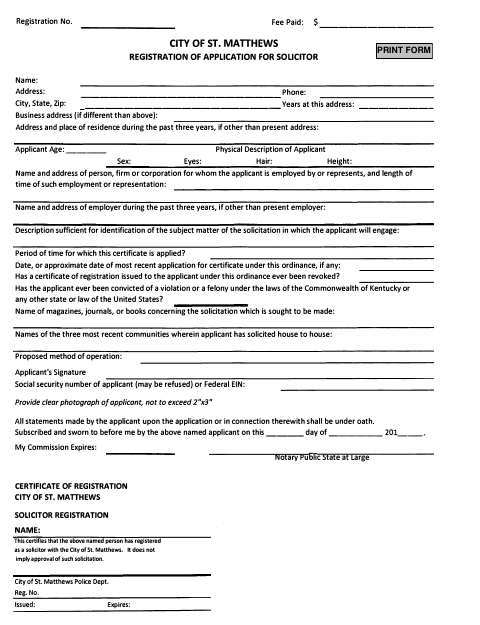
The City of St. Matthews form asks applicants for identifying details, recent addresses and employers, information about the proposed solicitation, and related background. Applicants must sign under oath, and the form includes a notary block. The accompanying registration certificate states that the named person has registered as a solicitor with the city; it does not imply the city approves the solicitation.
Who needs it
Anyone applying to register as a solicitor with the City of St. Matthews should complete this form and provide the requested photograph and application details.
How to get this notarized
- 1
Download the Application
Get the City of St. Matthews Solicitor Registration Application.
- 2
Complete the Form
Enter the requested applicant, residence, employment, and solicitation information, and provide a clear photograph.
- 3
Book an Online Notary
Schedule a remote session with a commissioned online notary before signing.
- 4
Sign on Video
Sign the application under oath during your online notarization appointment.
- 5
Submit to the City
Send the completed application to the City of St. Matthews for processing.
Preview the form
The blank PDF straight from St. Matthews. Look it over, then upload your filled copy to start the notary session.

You’ll need ID and a webcam.
A licensed online notary will join you on video, verify your government-issued ID, witness your signature, and apply their seal. You’ll receive the notarized PDF by email when the session ends.
Frequently asked questions
- How do I complete the solicitor registration application?
- Fill in the requested personal, address, employment, and solicitation details, provide a clear photograph, then sign under oath before a commissioned online notary.
- Do I need to sign the application in front of a notary?
- Yes. The form says all statements are under oath and includes a sworn-and-subscribed jurat. Sign before the notary, not beforehand.
- Can I notarize this application online?
- Kentucky permits a commissioned online notary to perform remote notarizations under KRS 423.355. Confirm with the city or county clerk if unsure whether the city will accept your notarized form.
- What happens after I submit the application?
- The form includes a City of St. Matthews solicitor registration certificate. It states that registration does not imply approval of the solicitation.