
Fort Mitchell, KY · Kenton County
Hardship Affidavit
The City of Fort Mitchell Hardship Affidavit lets a property owner explain a qualifying hardship that prevents payment of a current property tax balance and provide supporting documentation.
- licensed online notary
- ~15 min average
- Notarized PDF emailed
What you’ll need
- Government-issued photo ID
- Webcam-enabled device (laptop or phone)
- This form, ready to upload as a PDF
What this form is
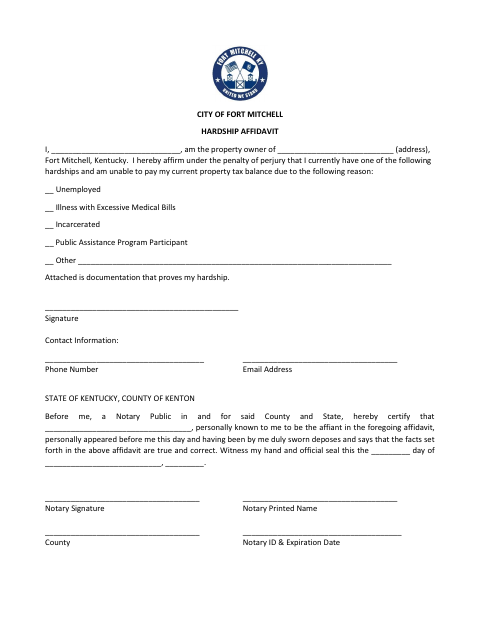
A Fort Mitchell property owner uses this affidavit to state that a hardship—such as unemployment, illness with excessive medical bills, incarceration, or participation in a public assistance program—makes it difficult to pay the current property tax balance. The form also asks for the property address, contact information, and documentation proving the hardship. The owner signs under oath before a notary.
Who needs it
A Fort Mitchell property owner who cannot pay a current property tax balance because of a listed hardship or another circumstance should complete this affidavit.
How to get this notarized
- 1
Download the Affidavit
Get the City of Fort Mitchell Hardship Affidavit and review its fields and notary section.
- 2
Complete the Form
Add your name, property address, hardship reason, and contact information. Attach documentation that proves your hardship.
- 3
Book an Online Notary
Arrange a session with a commissioned online notary, after confirming the city accepts online notarization for this form.
- 4
- 5
Submit to the City
Send the completed, notarized affidavit and supporting documentation to the City of Fort Mitchell as directed.
Preview the form
The blank PDF straight from Fort Mitchell. Look it over, then upload your filled copy to start the notary session.

You’ll need ID and a webcam.
A licensed online notary will join you on video, verify your government-issued ID, witness your signature, and apply their seal. You’ll receive the notarized PDF by email when the session ends.
Frequently asked questions
- How do I complete the Fort Mitchell Hardship Affidavit?
- Enter your name, property address, hardship reason, and contact details, then attach documentation that proves your hardship. Sign the affidavit before a notary.
- Do I need to sign the affidavit in front of a notary?
- Yes. The form’s jurat says the affiant personally appeared before a notary, was sworn, and affirmed that the affidavit’s facts are true and correct.
- Can I use an online notary for this affidavit?
- Kentucky authorizes online notarization by a commissioned online notary. Confirm that the City of Fort Mitchell will accept an online-notarized affidavit before signing.
- Where should I submit the completed affidavit?
- The form is titled for the City of Fort Mitchell. Confirm the submission method with the city; confirm with the city or county clerk if unsure.