
Fort Mitchell, KY · Kenton County
Solicitation Registration Form
This three-page form lets individuals or authorized business representatives apply to the City of Fort Mitchell for a residential solicitation permit or group solicitation permit.
- licensed online notary
- ~15 min average
- Notarized PDF emailed
What you’ll need
- Government-issued photo ID
- Webcam-enabled device (laptop or phone)
- This form, ready to upload as a PDF
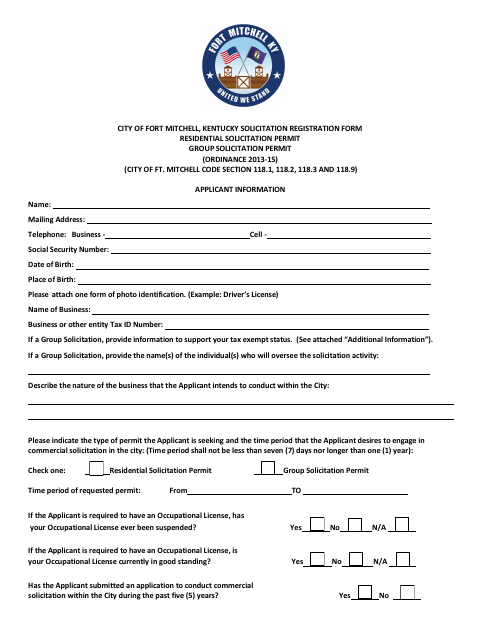
What this form is
Applicants use this form to provide personal and business details, describe their planned solicitation, request a permit period, and answer questions about licenses and prior permit history. Attach photo identification and any required occupational or professional licenses; group applicants must provide information supporting tax-exempt status. Submit the completed application and applicable fee to the City Clerk, who refers it for review.
Who needs it
Individuals or authorized representatives planning commercial solicitation in Fort Mitchell must complete this form and obtain the applicable permit.
Why it needs a notary
The applicant or authorized representative signs before a notary, who completes the form’s block stating it was sworn to and acknowledged before them.
How to get this notarized
- 1
Download the Form
Get the Solicitation Registration Form and its accompanying additional information.
- 2
Complete the Application
Provide applicant and business details, select a permit type and period, answer the listed questions, and gather required attachments.
- 3
Book an Online Notary
Arrange a session with a commissioned online notary to notarize the application.
- 4
Sign on Video
Sign the form during the online session so the notary can complete the sworn-and-acknowledged block.
- 5
Submit to the City
Send the completed application, required attachments, and applicable fee to the Fort Mitchell City Clerk.
Preview the form
The blank PDF straight from Fort Mitchell. Look it over, then upload your filled copy to start the notary session.

You’ll need ID and a webcam.
A licensed online notary will join you on video, verify your government-issued ID, witness your signature, and apply their seal. You’ll receive the notarized PDF by email when the session ends.
Frequently asked questions
- How do I apply for a Fort Mitchell solicitation permit?
- Complete the form, attach photo identification and any required licenses or group tax-exempt documentation, and submit it with the applicable fee to the City Clerk.
- Do I need to sign the form in front of a notary?
- Yes. The form includes a block stating that the application was sworn to and acknowledged before a notary. Sign before the notary completes that block.
- Can I use a commissioned online notary?
- Kentucky authorizes its notaries to perform online notarizations through online-notary registration, and recognizes notarial acts performed by a notary public or other authorized officer of another state. Confirm the City Clerk will accept the notarized form.
- What fee should I include with my application?
- The form lists a $25 fee for permits lasting seven to 90 days and a $100 fee for permits lasting more than 90 days up to one year. It describes a fee exemption for qualifying nonprofit organizations.
- Where do I submit the completed form?
- The form says to submit the application and applicable fee to the City Clerk of Fort Mitchell. Confirm with the city or county clerk if unsure.