
Brunswick, ME · Cumberland County
Notarized Statement for License Pickup
This statement lets a person designate someone else to purchase and pick up their commercial shellfish license during a specified period; the license holder submits it to the Town Clerk’s Office.
- licensed online notary
- ~15 min average
- Notarized PDF emailed
What you’ll need
- Government-issued photo ID
- Webcam-enabled device (laptop or phone)
- This form, ready to upload as a PDF
What this form is
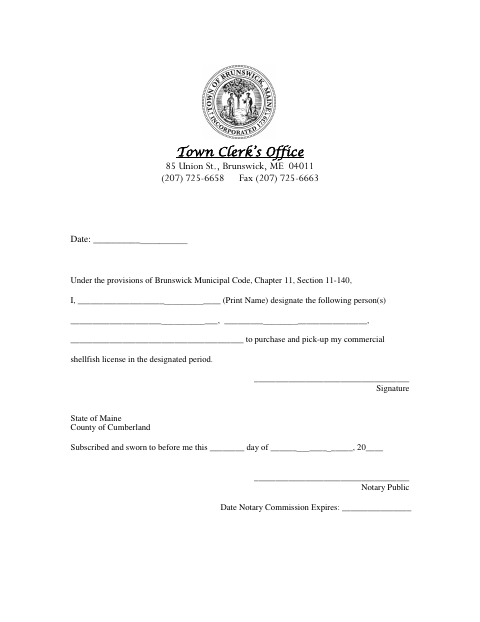
Use this statement to name the person or people authorized to purchase and pick up your commercial shellfish license during the designated period. The form identifies the license holder and designees, includes a signature and date, and requires the license holder to swear to the statement before a notary. The form cites Brunswick Municipal Code, Chapter 11, Section 11-140.
Who needs it
A commercial shellfish license holder who wants to authorize another person to purchase and pick up the license during a designated period needs this statement.
Why it needs a notary
The form has a State of Maine and County of Cumberland jurat; the license holder signs and swears to the statement before the notary.
How to get this notarized
- 1
Download the Form
Get the Notarized Statement for License Pickup from the Brunswick Town Clerk’s Office.
- 2
Fill In the Statement
Enter the date, print your name, identify the person or people you authorize, and review the designated period.
- 3
Book an Online Notary
Arrange a session with a commissioned online notary and have the statement ready to sign.
- 4
Sign on Video
Sign and swear to the statement during the notary’s remote video session.
- 5
Submit to the Town
Send the completed, notarized statement to the Brunswick Town Clerk’s Office and confirm its submission instructions.
Preview the form
The blank PDF straight from Brunswick. Look it over, then upload your filled copy to start the notary session.

You’ll need ID and a webcam.
A licensed online notary will join you on video, verify your government-issued ID, witness your signature, and apply their seal. You’ll receive the notarized PDF by email when the session ends.
Frequently asked questions
- How do I complete the license pickup statement?
- Name the person or people you authorize, complete the date and signature fields, then swear to and sign the statement before a notary. Submit it to the Town Clerk’s Office.
- Do I need to sign the statement in front of a notary?
- Yes. The form includes a jurat stating that it was subscribed and sworn to before a notary, so sign and swear to it in the notary’s presence.
- Can I use a commissioned online notary?
- Maine law, 4 M.R.S. ch. 39, §1915, authorizes remote notarization by a commissioned online notary. Confirm with the town, city, or county registry of deeds if unsure; for this form, check with the Town Clerk’s Office.
- Where do I submit the completed statement?
- The form lists the Town Clerk’s Office at 85 Union St., Brunswick, ME 04011. Contact the office to confirm how to submit the notarized statement.