
Provincetown, MA · Barnstable County
Affidavit for Final Cost of Construction
This affidavit states the final construction cost for a building covered by a Provincetown building permit and is completed and submitted by the owner.
- licensed online notary
- ~15 min average
- Notarized PDF emailed
What you’ll need
- Government-issued photo ID
- Webcam-enabled device (laptop or phone)
- This form, ready to upload as a PDF
What this form is
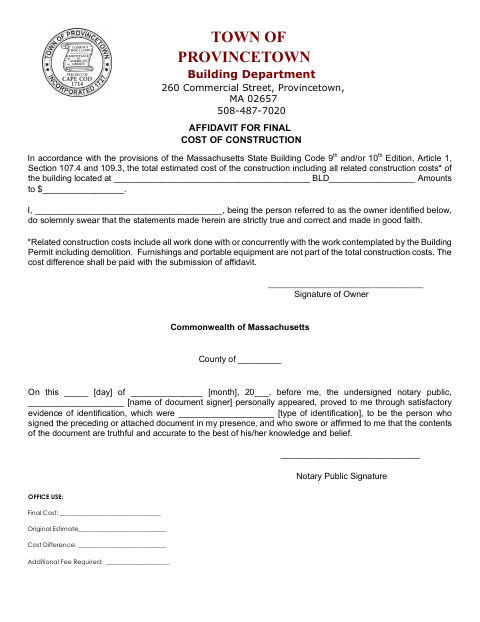
This affidavit reports the total estimated cost of construction and related work for a building covered by a Provincetown building permit. The owner swears that the stated information is true and correct in good faith; related costs include concurrent work and demolition, while furnishings and portable equipment are excluded. Submit the affidavit with the final cost information; the form says any cost difference is due with its submission.
Who needs it
The owner identified on the form completes it for a building covered by a Provincetown building permit and submits it with the final cost information.
Why it needs a notary
The form carries a state jurat; the owner named in the affidavit signs and swears or affirms before the notary public.
How to get this notarized
- 1
Download the Affidavit
Get the Cost of Construction Affidavit from the Town of Provincetown.
- 2
Fill In the Form
Enter the building location, total construction cost, and owner's name. Review which related costs are included.
- 3
Book an Online Notary
Arrange a session with a commissioned online notary before signing.
- 4
Sign on Video
Appear for the online notarization and swear or affirm that the affidavit's statements are true and correct.
- 5
Submit to the Town
Submit the notarized affidavit with the final cost information to the Town of Provincetown.
Preview the form
The blank PDF straight from Provincetown. Look it over, then upload your filled copy to start the notary session.

You’ll need ID and a webcam.
A licensed online notary will join you on video, verify your government-issued ID, witness your signature, and apply their seal. You’ll receive the notarized PDF by email when the session ends.
Frequently asked questions
- How do I submit the final cost affidavit?
- Complete the owner and construction cost information, sign before a notary, and submit the affidavit with the final cost information. The form says any cost difference is due with submission.
- Do I need to include furnishings and portable equipment?
- No. The form excludes furnishings and portable equipment from total construction costs. It includes related work done with or concurrently with the work covered by the building permit, including demolition.
- Can I sign this affidavit with a commissioned online notary?
- Massachusetts permanently authorized remote online notarization for its own notaries effective January 1, 2024. Ask the city or town clerk whether the notarized form meets its submission requirements.
- What if I am unsure how to complete or submit the form?
- The form identifies the Town of Provincetown Building Department and says the cost difference is due with submission. For questions about local submission requirements, confirm with the city or town clerk if unsure.
Affidavit for Final Cost of Construction in other Massachusetts cities
Each city publishes its own version of this form. Pick the city where you’re filing.