
Williamstown, MA · Berkshire County
Business Certificate Discontinuance Statement
This statement reports discontinuing or withdrawing from a business or partnership, a change of residence or business location, or a deceased person's departure from a business to the city or town clerk.
- licensed online notary
- ~15 min average
- Notarized PDF emailed
What you’ll need
- Government-issued photo ID
- Webcam-enabled device (laptop or phone)
- This form, ready to upload as a PDF
What this form is
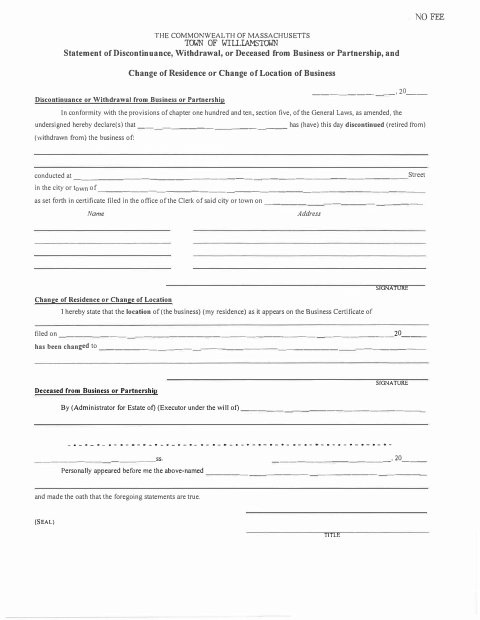
Williamstown’s form lets a business owner or partner report discontinuing or withdrawing from a business, changing a business location or residence, or an administrator or executor report a deceased person’s departure from a business. It refers to a Business Certificate previously filed with the city or town clerk and states that the information is sworn to be true. The form cites Massachusetts General Laws chapter 110, section 5.
Who needs it
A business owner or partner reporting a discontinuance, withdrawal, or address change, or an estate administrator or executor reporting a deceased person's departure, may use this statement.
How to get this notarized
- 1
Download the Form
Get the Business Certificate Discontinuance Statement from the Williamstown municipal website.
- 2
Fill Out the Statement
Complete the section that applies to the business discontinuance, withdrawal, change of location or residence, or deceased person's departure.
- 3
Book an Online Notary
Schedule a remote session with a commissioned online notary.
- 4
Sign and Swear on Video
Appear by video, sign as directed, and take the oath that the statements are true.
- 5
Submit to the City
Submit the completed statement to the Williamstown city or town clerk.
Preview the form
The blank PDF straight from Williamstown. Look it over, then upload your filled copy to start the notary session.

You’ll need ID and a webcam.
A licensed online notary will join you on video, verify your government-issued ID, witness your signature, and apply their seal. You’ll receive the notarized PDF by email when the session ends.
Frequently asked questions
- How do I notarize this business discontinuance statement online?
- Complete the statement, book a session with a commissioned online notary, and sign and swear to its truth during the video session. Check with the city or town clerk about submitting the completed form.
- Do I need to take an oath before signing this form?
- Yes. The form says the person named above personally appeared and swore that the statements were true. Sign and take the oath before the notary.
- Can a commissioned online notary notarize this form?
- Massachusetts permanently authorized remote online notarization by its notaries effective January 1, 2024, under G.L. c. 222, §§27–29. Confirm with the city or town clerk if unsure whether the notarized form meets its filing requirements.
Other forms in Williamstown
Business Certificate Discontinuance Statement in other Massachusetts cities
Each city publishes its own version of this form. Pick the city where you’re filing.