
Williamstown, MA · Berkshire County
Business Certificate
This certificate records the people or corporation conducting business under a business title and is filed with the Williamstown Town Clerk for a new filing or renewal.
- licensed online notary
- ~15 min average
- Notarized PDF emailed
What you’ll need
- Government-issued photo ID
- Webcam-enabled device (laptop or phone)
- This form, ready to upload as a PDF
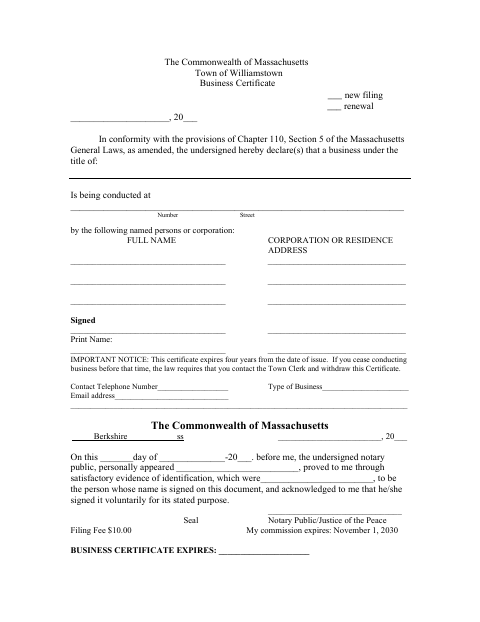
What this form is
Use this form to declare the business title, business location, and names and addresses of the people or corporation conducting business under that title. The form identifies the filing as new or renewal and states that the certificate expires four years after issuance. It also says to contact the Town Clerk to withdraw the certificate if you stop conducting business before it expires; the form lists a $10 filing fee.
Who needs it
People or corporations conducting business under a business title in Williamstown use this certificate to make a new filing or renew an existing one with the Town Clerk.
Why it needs a notary
The form contains an acknowledgment block: each signer whose name appears on the document must personally appear before the notary and acknowledge signing voluntarily for its stated purpose.
How to get this notarized
- 1
Download the Form
Get the blank Business Certificate from the Williamstown town website.
- 2
Fill In the Certificate
Identify whether this is a new filing or renewal, then enter the business title, location, and required names and addresses.
- 3
Book an Online Notary
Schedule a remote session with a commissioned online notary for the form’s acknowledgment.
- 4
Acknowledge Your Signature on Video
Appear for the video appointment and acknowledge signing the certificate voluntarily for its stated purpose.
- 5
Submit to the Town Clerk
File the notarized certificate with the Williamstown Town Clerk and confirm the filing fee.
Preview the form
The blank PDF straight from Williamstown. Look it over, then upload your filled copy to start the notary session.

You’ll need ID and a webcam.
A licensed online notary will join you on video, verify your government-issued ID, witness your signature, and apply their seal. You’ll receive the notarized PDF by email when the session ends.
Frequently asked questions
- How do I notarize the Williamstown Business Certificate online?
- Complete the form, book a remote session with a commissioned online notary, and acknowledge your signature during the video appointment. Submit the notarized certificate to the Williamstown Town Clerk.
- Do I need to sign the certificate in front of a notary?
- Yes. The form includes an acknowledgment requiring the signer to appear before a notary and acknowledge signing voluntarily for the document’s stated purpose.
- Can I use remote online notarization for this form?
- Massachusetts permanently authorized remote online notarization for its own notaries effective January 1, 2024, under G.L. c. 222, §§ 27–29, inserted by Chapter 2 of the Acts of 2023. Book a commissioned online notary.
- Where do I file the notarized certificate?
- The form directs filers to the Town Clerk. It says the filing fee is $10; confirm with the city or town clerk if unsure.
Other forms in Williamstown
Business Certificate in other Berkshire County cities
Each city publishes its own version of this form. Pick the city where you’re filing.