
Wakefield, MA · Middlesex County
Home Health Aide Criminal Offender Record Information Request Form
This form lets an elderly or disabled person, guardian, or authorized power-of-attorney holder request a criminal record check to screen a prospective home health aide.
- licensed online notary
- ~15 min average
- Notarized PDF emailed
What you’ll need
- Government-issued photo ID
- Webcam-enabled device (laptop or phone)
- This form, ready to upload as a PDF
What this form is
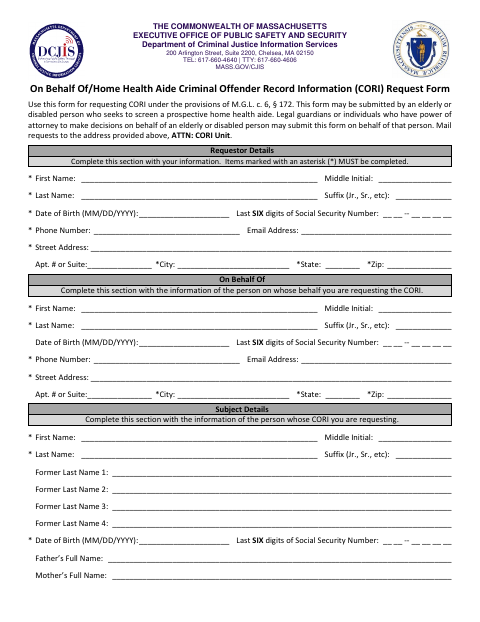
The form gathers details about the requestor, the person represented, and the person whose CORI is requested, and includes the applicant’s agreement and the requestor’s notarized signature. The form says it may be submitted by an elderly or disabled person or by a legal guardian or person with power of attorney, and directs requestors to mail it to the DCJIS CORI Unit in Chelsea.
Who needs it
An elderly or disabled person screening a prospective home health aide, or that person’s legal guardian or authorized power-of-attorney holder, may submit this request.
Why it needs a notary
The form includes an acknowledgment of the requestor’s signature: the requestor personally appears, presents satisfactory identification, and acknowledges signing voluntarily for the stated purpose.
How to get this notarized
- 1
Download the Form
Get the Home Health Aide CORI Request Form from the Wakefield document link.
- 2
Fill In the Request Details
Complete the requestor, on-behalf-of, and subject information, and review the applicant’s agreement and form terms.
- 3
Book an Online Notary
Arrange a session with a commissioned online notary for the form’s requestor acknowledgment.
- 4
Sign on Video
Appear before the notary, present satisfactory identification, and acknowledge your signature as the notary completes the authentication section.
- 5
Mail the Request to DCJIS
Mail the completed form to the address printed on it, Attention: CORI Unit.
Preview the form
The blank PDF straight from Wakefield. Look it over, then upload your filled copy to start the notary session.

You’ll need ID and a webcam.
A licensed online notary will join you on video, verify your government-issued ID, witness your signature, and apply their seal. You’ll receive the notarized PDF by email when the session ends.
Frequently asked questions
- How do I submit the Home Health Aide CORI request?
- Complete the requestor, represented-person, and subject sections, sign before a notary, and mail the form to the DCJIS address shown on the form, Attention: CORI Unit.
- Do I need to sign this form in front of a notary?
- Yes. The form’s authentication section says the requestor must personally appear before a notary, show satisfactory identification, and acknowledge signing voluntarily.
- Can I notarize the request form online?
- Massachusetts permanently authorized remote online notarization by its notaries effective January 1, 2024, under G.L. c. 222, §§ 27–29. Check with the receiving agency about its acceptance requirements.
- Who can request CORI to screen a home health aide?
- The form says an elderly or disabled person may request CORI to screen a prospective home health aide. A legal guardian or person with power of attorney may submit it on that person’s behalf.
- Where should I check if I am unsure about a local filing question?
- The form directs requests to the DCJIS CORI Unit, not a city office. For questions about a separate local filing, confirm with the city or town clerk if unsure.