
Weston, MA · Middlesex County
Affidavit for Final Cost of Construction
This affidavit reports the total final construction cost, including related work, for a building covered by a permit and is filed with Weston’s Inspectional Services Department.
- licensed online notary
- ~15 min average
- Notarized PDF emailed
What you’ll need
- Government-issued photo ID
- Webcam-enabled device (laptop or phone)
- This form, ready to upload as a PDF
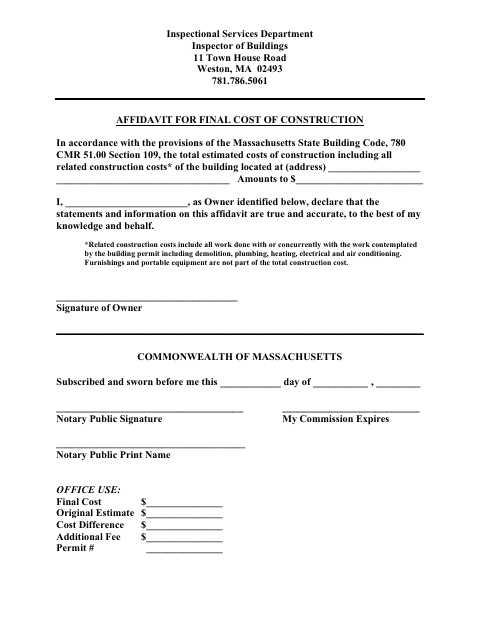
What this form is
Weston’s Inspectional Services Department uses this affidavit to document the final construction cost for a permitted building. The owner states the building address and total cost, including related construction work such as demolition, plumbing, heating, electrical, and air conditioning; furnishings and portable equipment are excluded. The form also provides fields for town staff to compare the final cost with the original estimate and calculate any additional fee.
Who needs it
The owner identified on the affidavit needs it to report final construction costs for a building covered by a Weston building permit.
How to get this notarized
- 1
Download the Affidavit
Get Weston’s Affidavit for Final Cost of Construction from the city’s form page.
- 2
Complete the Form
Enter the building address and total construction cost, and provide the owner’s information.
- 3
Book an Online Notary
Arrange a remote notarization with a commissioned online notary before signing.
- 4
- 5
Submit to Weston
Send the completed affidavit to Weston’s Inspectional Services Department.
Preview the form
The blank PDF straight from Weston. Look it over, then upload your filled copy to start the notary session.

You’ll need ID and a webcam.
A licensed online notary will join you on video, verify your government-issued ID, witness your signature, and apply their seal. You’ll receive the notarized PDF by email when the session ends.
Frequently asked questions
- How do I complete the final construction cost affidavit?
- Enter the building address and total construction cost, including related construction work. The owner signs under oath before a notary, then submits the completed affidavit to Weston’s Inspectional Services Department.
- Do I need to include furnishings in the construction cost?
- No. The form says furnishings and portable equipment are not part of the total construction cost. It includes related work such as demolition, plumbing, heating, electrical, and air conditioning.
- Can I sign this affidavit with an online notary?
- Massachusetts permanently authorized remote online notarization by its notaries effective January 1, 2024. You can sign during a video session with a commissioned online notary.
- Where do I submit the completed affidavit?
- The form is provided by Weston’s Inspectional Services Department, Inspector of Buildings. Confirm submission details with that department; confirm with the city or town clerk if unsure.