
Weston, MA · Middlesex County
Business Certificate Application
Weston’s Business Certificate Application records a business name, nature, location, and the people conducting it; named business owners complete it for filing with the Town Clerk.
- licensed online notary
- ~15 min average
- Notarized PDF emailed
What you’ll need
- Government-issued photo ID
- Webcam-enabled device (laptop or phone)
- This form, ready to upload as a PDF
What this form is
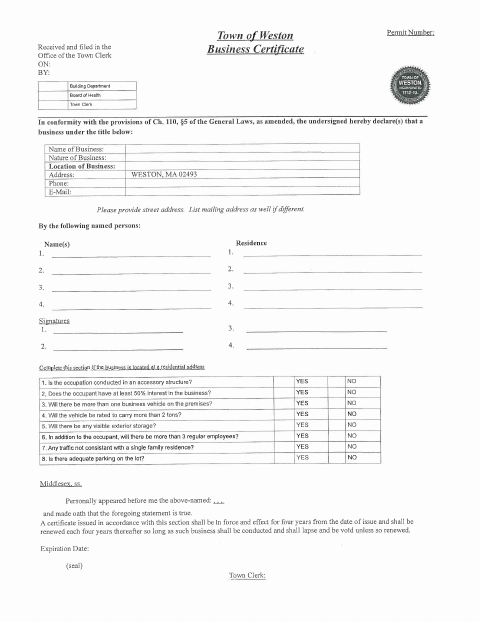
Use this form to provide the business name, nature, location, contact details, and the names and residences of the people conducting the business. If the business is at a residential address, the form also asks questions about the property, business activity, employees, traffic, and parking. The Town Clerk files the application, and the form states that an issued certificate remains in effect for four years and must be renewed every four years.
Who needs it
People conducting a business under a title in Weston complete this application with business details and the names and residences of the people involved.
How to get this notarized
- 1
Download The Form
Get Weston’s Business Certificate Application from the Town’s document page.
- 2
Fill In The Application
Provide the business details and named persons’ information; answer the residential-address questions if they apply.
- 3
Book An Online Notary
Arrange a remote notarization appointment for the form’s oath.
- 4
Take The Oath On Video
The named persons appear before the notary and sign as directed in the jurat.
- 5
Submit To The Town
Submit the completed application to the Weston Town Clerk for filing.
Preview the form
The blank PDF straight from Weston. Look it over, then upload your filled copy to start the notary session.

You’ll need ID and a webcam.
A licensed online notary will join you on video, verify your government-issued ID, witness your signature, and apply their seal. You’ll receive the notarized PDF by email when the session ends.
Frequently asked questions
- How do I complete the Business Certificate Application?
- Enter the business details and the names and residences of the people conducting it. Complete the residential-address questions if applicable, then sign under oath before a notary and submit it to the Town Clerk.
- Do I need to sign this application in front of a notary?
- Yes. The form’s jurat says the named persons appeared and made oath that the statement is true. They should sign before the notary.
- Can I use a commissioned online notary?
- Massachusetts permanently authorized remote online notarization for its own notaries effective January 1, 2024, under G.L. c. 222, §§27–29. Confirm the Town Clerk will accept the remotely notarized form.
- When does the certificate need to be renewed?
- The form states that a certificate is effective for four years from its issue date and must be renewed every four years while the business continues. Confirm with the city or town clerk if unsure.
Other forms in Weston
Business Certificate Application in other Middlesex County cities
Each city publishes its own version of this form. Pick the city where you’re filing.