
Douglas, MA · Worcester County
Easement and Utilities Deed
The Town of Douglas Planning Board’s Easement and Utilities Deed grants the Town perpetual utility or other specified easement rights and is completed by the property owner and, when applicable, a mortgage holder.
- licensed online notary
- ~15 min average
- Notarized PDF emailed
What you’ll need
- Government-issued photo ID
- Webcam-enabled device (laptop or phone)
- This form, ready to upload as a PDF
What this form is
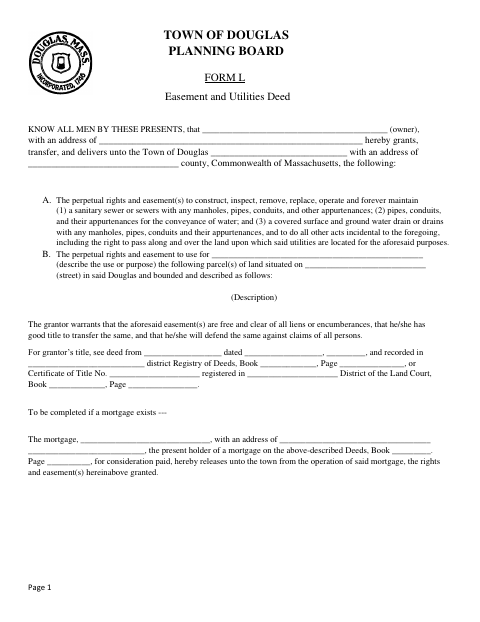
Town of Douglas Planning Board Form L documents a grant to the Town of perpetual rights to construct, operate, and maintain specified utilities, and may also describe another use or purpose for an easement. The form includes the parcel description, title information, and an optional mortgage release if a mortgage exists. The owner, spouse as far as necessary, and mortgagee where applicable complete their respective signature and acknowledgment sections.
Who needs it
Property owners completing a grant of utility or other easement rights to the Town of Douglas use this form, with a spouse or mortgage holder signing where applicable.
Why it needs a notary
The form carries acknowledgment blocks for the owner, owner’s spouse, and mortgagee; each signer completes the applicable signature section and acknowledges the instrument before a notary.
How to get this notarized
- 1
Download the Form
Get the Easement and Utilities Deed from the Town of Douglas.
- 2
Complete the Form
Fill in the grantor, easement purpose, parcel description, and applicable title or mortgage details.
- 3
Book an Online Notary
Schedule a video appointment with a commissioned online notary.
- 4
Sign on Video
Sign the applicable section and acknowledge the instrument during the notarial video session.
- 5
Submit to the Town
Send the completed form to the Town of Douglas as directed.
Preview the form
The blank PDF straight from Douglas. Look it over, then upload your filled copy to start the notary session.

You’ll need ID and a webcam.
A licensed online notary will join you on video, verify your government-issued ID, witness your signature, and apply their seal. You’ll receive the notarized PDF by email when the session ends.
Frequently asked questions
- How do I get the Easement and Utilities Deed notarized online?
- Complete the applicable sections, book an appointment with a commissioned online notary, and sign during the video session. Submit the completed form to the Town of Douglas.
- Do I need my spouse or mortgage holder to sign?
- The form includes a spouse release section and a mortgagee release section when a mortgage exists. Check the form and confirm with the city or town clerk if unsure.
- Can I use a commissioned online notary for this form?
- Massachusetts permanently authorized remote online notarization for its own notaries effective January 1, 2024. An acknowledgment taken outside the Commonwealth by a notary authorized where it was taken is recognized under G.L. c. 183, §30(b).
- What should I bring to the online notarization?
- Have the completed form available and be prepared to sign the applicable owner, spouse, or mortgagee section during the video appointment. The form also asks for parcel and title information.
Other forms in Douglas
Agreement to Secure Performance by Bank Passbook
Douglas
Definitive Subdivision Covenant
Douglas
Release of Covenant and Conditions
Douglas
Subdivision Lender’s Agreement
Douglas
Agreement to Secure Performance by a Deposit of Money
Douglas
Agreement to Secure Performance by Deposit of Negotiable Securities
Douglas