
Princeton, MA · Worcester County
Mobile Food Licensing Application
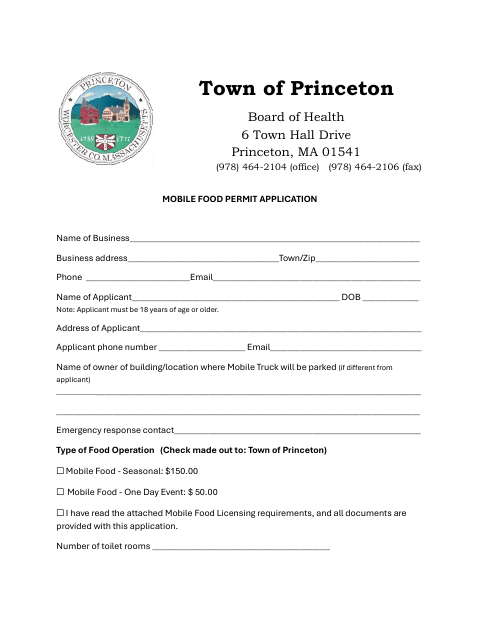
This application requests a Town of Princeton mobile food permit and is filed by a business applicant seeking to operate a mobile food service seasonally or at a one-day event.
- licensed online notary
- ~15 min average
- Notarized PDF emailed
What you’ll need
- Government-issued photo ID
- Webcam-enabled device (laptop or phone)
- This form, ready to upload as a PDF
What this form is
The application asks for business and applicant details, the proposed location, food-service equipment, water and waste information, operating hours, and other health and safety details. Applicants select a seasonal or one-day event permit and certify compliance with applicable requirements. If an applicant claims an exemption from workers’ compensation insurance, the form requires a separate sworn statement to be signed before a notary and submitted with the application to the Town of Princeton Board of Health.
Who needs it
A business applicant seeking a seasonal or one-day mobile food permit from the Town of Princeton Board of Health needs this application.
Why it needs a notary
The workers’ compensation exemption section carries a sworn-and-subscribed jurat; the applicant or co-owners claiming an exemption sign that statement before the notary.
How to get this notarized
- 1
Download the Application
Get the Town of Princeton Mobile Food Permit Application and review its application and workers’ compensation sections.
- 2
Complete the Form
Enter the requested business, applicant, location, food-service, and operating details, and select the permit type.
- 3
Book an Online Notary
If claiming a workers’ compensation exemption, book a remote appointment with a commissioned online notary.
- 4
Sign on Video
Sign the exemption statement during the video session so the notary can complete the jurat.
- 5
Submit to the Town
Attach any required supporting documents and submit the completed application to the Town of Princeton Board of Health.
Preview the form
The blank PDF straight from Princeton. Look it over, then upload your filled copy to start the notary session.

You’ll need ID and a webcam.
A licensed online notary will join you on video, verify your government-issued ID, witness your signature, and apply their seal. You’ll receive the notarized PDF by email when the session ends.
Frequently asked questions
- How do I get the workers’ compensation exemption statement notarized?
- Complete the applicable exemption statement, then book a video appointment with a commissioned online notary. Sign the statement during the session and submit it with the application.
- Do I need notarization for every mobile food permit application?
- The form requires notarization when you claim one of the listed workers’ compensation insurance exemptions. It does not identify the rest of the application as requiring notarization.
- Can I sign the exemption statement online with a notary?
- Massachusetts permanently authorized remote online notarization for its own notaries effective January 1, 2024, under G.L. c. 222, §§27–29. G.L. c. 183, §30(b) recognizes qualifying acknowledgments taken outside the Commonwealth.
- Where do I submit the completed application?
- The form is for the Town of Princeton Board of Health. Contact the Board about filing details; confirm with the city or town clerk if unsure.