
Lansing, MI · Ingham County
Canvasser/Street Peddler License Application
This six-page application is for individuals and businesses seeking a Lansing license to canvass, solicit orders, or sell goods while traveling from place to place in the city.
- licensed online notary
- ~15 min average
- Notarized PDF emailed
What you’ll need
- Government-issued photo ID
- Webcam-enabled device (laptop or phone)
- This form, ready to upload as a PDF
What this form is
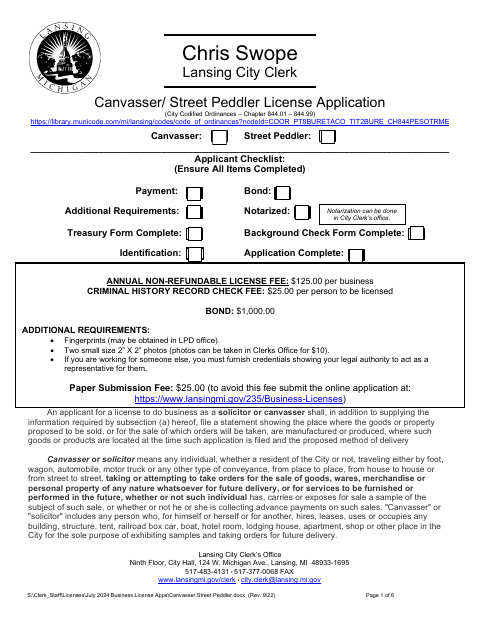
Use this application to request a Lansing license for canvassing, soliciting orders, or peddling goods. It collects applicant and business details, information about goods and delivery, work schedules, vehicles, bond details, and the applicant’s sworn statement. The checklist also calls for payment, a bond, identification, fingerprints, photographs, and completed treasury and background-check forms; submit the completed materials to the City Clerk’s Office.
Who needs it
Individuals applying to canvass, solicit orders, or peddle goods in Lansing must complete the application and provide the listed supporting materials.
Why it needs a notary
The form includes a “Subscribed and sworn to before me” jurat; the applicant signs the application’s sworn statement before the notary.
How to get this notarized
- 1
Download the Application
Get the six-page Canvasser/Street Peddler License Application and its included treasury and background-check forms.
- 2
Complete the Application
Fill in the applicant and business details, describe the goods and delivery method, and review the checklist and supporting requirements.
- 3
Book an Online Notary
Arrange an online notarization for the applicant’s sworn statement and have valid identification ready.
- 4
Sign During the Video Session
Sign the sworn statement before the commissioned online notary, who completes the jurat.
- 5
Submit to the City
Submit the completed application and required materials to the Lansing City Clerk’s Office.
Preview the form
The blank PDF straight from Lansing. Look it over, then upload your filled copy to start the notary session.

You’ll need ID and a webcam.
A licensed online notary will join you on video, verify your government-issued ID, witness your signature, and apply their seal. You’ll receive the notarized PDF by email when the session ends.
Frequently asked questions
- How do I get the canvasser application notarized online?
- Complete the application, book with a commissioned online notary, and sign the sworn statement during the video session. The notary completes the form’s jurat.
- Do I need to have this application notarized?
- Yes. The applicant checklist identifies notarization as required, and the application includes a “Subscribed and sworn to before me” block.
- Can I use a commissioned online notary for this application?
- Michigan permits remote electronic notarization by a commissioned online notary. The form also says notarization can be done in the City Clerk’s Office; confirm acceptance with the office if unsure.
- What else does the application checklist require?
- The checklist names payment, a bond, identification, a completed treasury form, and a completed background-check form. The application also lists fingerprints and two 2-by-2-inch photos.