
Pontiac, MI · Oakland County
Application for Description Change
Pontiac property owners use this application to request a lot combination or lot split through the City’s Office of Land Use and Strategic Planning.
- licensed online notary
- ~15 min average
- Notarized PDF emailed
What you’ll need
- Government-issued photo ID
- Webcam-enabled device (laptop or phone)
- This form, ready to upload as a PDF
What this form is
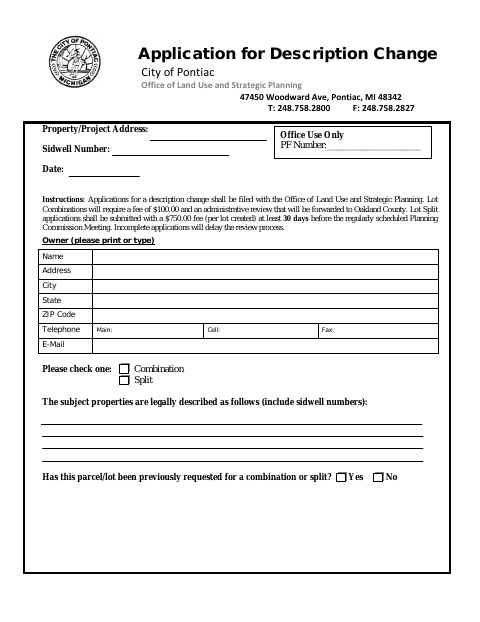
File this application with Pontiac’s Office of Land Use and Strategic Planning to request a change involving a property description, choosing either a lot combination or a lot split. Lot combinations require a fee and administrative review forwarded to Oakland County; lot splits require a fee per lot and must be submitted at least 30 days before a regularly scheduled Planning Commission meeting. Attach the required ownership, tax, assessment, and, for lot splits, survey documents.
Who needs it
Property owners requesting a lot combination or lot split in Pontiac must submit the application, and all parties with an ownership interest must sign.
Why it needs a notary
The form has a sworn jurat stating the signer appeared and was duly sworn; each signing owner must sign before a commissioned online notary.
How to get this notarized
- 1
Download the Application
Get Pontiac’s Application for Description Change and review the instructions and requirements for a lot combination or split.
- 2
Fill In the Form
Provide the property, parcel, and owner information; select combination or split; and gather the required supporting documents.
- 3
Book an Online Notary
Schedule a remote notarization with a commissioned online notary for the owners who must sign.
- 4
Sign on Video
Each signing owner appears on video, takes the oath, and signs as directed by the notary.
- 5
Submit to the City
File the completed application and required attachments with Pontiac’s Office of Land Use and Strategic Planning.
Preview the form
The blank PDF straight from Pontiac. Look it over, then upload your filled copy to start the notary session.

You’ll need ID and a webcam.
A licensed online notary will join you on video, verify your government-issued ID, witness your signature, and apply their seal. You’ll receive the notarized PDF by email when the session ends.
Frequently asked questions
- How do I complete the description change application online?
- Fill in the property and owner details, select combination or split, gather the required attachments, then book with a commissioned online notary and sign during the video session.
- Do I need to notarize this application?
- Yes. The form includes a jurat stating the signer appeared before a notary and was duly sworn. Each owner signing the application must sign before the notary.
- What documents and fees are listed for a lot split?
- The form lists a $750 fee per lot created, proof of paid taxes and special assessments, proof of ownership, and a survey with two copies of the drawing and legal description.
- Can I notarize this Pontiac form remotely?
- Michigan authorizes remote electronic notarization by its notaries under the Michigan Law on Notarial Acts, MCL 55.261 et seq. An authorized officer performing a notarial act in another state has the same effect under MCL 55.285a. Confirm with the city, village or township if unsure.