
Troy, MI · Oakland County
Going Out of Business Sale Application
This application requests a license to conduct a going-out-of-business sale and is filed by the business applicant with the Troy City Clerk’s Office.
- licensed online notary
- ~15 min average
- Notarized PDF emailed
What you’ll need
- Government-issued photo ID
- Webcam-enabled device (laptop or phone)
- This form, ready to upload as a PDF
What this form is
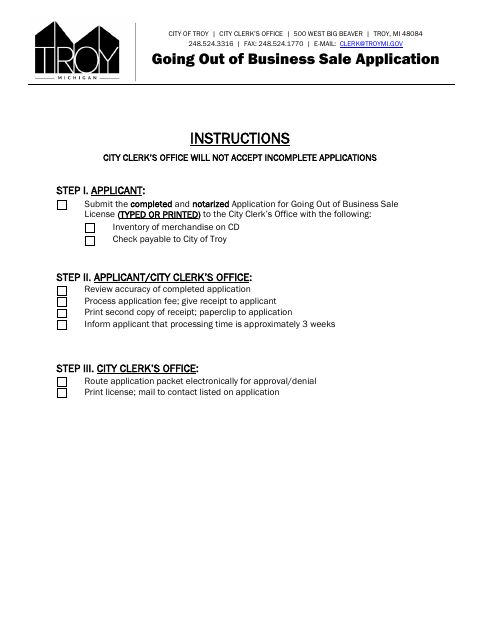
The application provides details about the business, the person responsible for the sale, the goods being sold, and the reason for the sale. Troy requires applicants to submit a completed, notarized application, a merchandise inventory on CD, and a check payable to the City of Troy. The application instructions say processing takes approximately three weeks and identify review by several city departments.
Who needs it
A business applicant seeking a Troy license to conduct a going-out-of-business sale must submit this application to the City Clerk’s Office.
Why it needs a notary
The form includes a subscribed-and-sworn jurat; the applicant must sign the statement of truth before a notary public.
How to get this notarized
- 1
Download The Application
Get the Going Out of Business Sale Application from the City of Troy.
- 2
Complete The Form
Fill in the business, responsible person, sale, and merchandise details; include the required inventory on CD.
- 3
Book An Online Notary
Schedule a remote session with a commissioned online notary.
- 4
Sign On Video
Sign the applicant statement during the video session so the notary can complete the jurat.
- 5
Submit To The City
Send the completed, notarized application, inventory CD, and check to the City Clerk’s Office.
Preview the form
The blank PDF straight from Troy. Look it over, then upload your filled copy to start the notary session.

You’ll need ID and a webcam.
A licensed online notary will join you on video, verify your government-issued ID, witness your signature, and apply their seal. You’ll receive the notarized PDF by email when the session ends.
Frequently asked questions
- How do I get this application notarized online?
- Complete the application, then book with a commissioned online notary. Sign the statement of truth during the video session and submit the notarized application with the required inventory CD and fee.
- Do I need to include an inventory with the application?
- Yes. The instructions require an inventory of merchandise on CD, along with a check payable to the City of Troy.
- What does the notary need to notarize?
- The applicant must sign the statement confirming the application information and statements are true. The form provides a subscribed-and-sworn jurat for the notary.
- Can I use an online notary for this form?
- Michigan law authorizes remote electronic notarization by Michigan notaries, and MCL 55.285a recognizes certain out-of-state notarial acts as having the same effect. Confirm with the city, village or township if unsure.
Going Out of Business Sale Application in other Michigan cities
Each city publishes its own version of this form. Pick the city where you’re filing.