
Westland, MI · Wayne County
Going Out of Business Application
This application requests a City of Westland license for a business sale and is filed by the applicant with the City Clerk’s Office before the sale.
- licensed online notary
- ~15 min average
- Notarized PDF emailed
What you’ll need
- Government-issued photo ID
- Webcam-enabled device (laptop or phone)
- This form, ready to upload as a PDF
What this form is
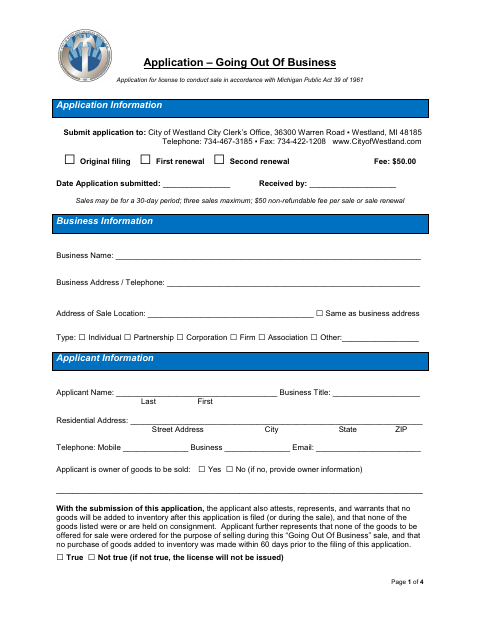
The application collects business and applicant details, sale dates and type, an explanation of the sale, and a detailed inventory of goods, including items purchased during the prior 60 days. The applicant submits it to the City Clerk’s Office with the required fee; the form states that sales may run for 30 days, with up to two renewals. The applicant swears or affirms that the application and attachments are true.
Who needs it
A business applicant seeking a City of Westland license for a qualifying sale must complete and submit this application to the City Clerk’s Office.
Why it needs a notary
The applicant signs the sworn-or-affirmed statement before a notary, who completes the jurat stating the applicant swore to and signed in the notary’s presence.
How to get this notarized
- 1
Download the Application
Get the Going Out of Business Application from the City of Westland.
- 2
Complete the Form and Inventory
Enter business, applicant, sale, and inventory details, and prepare the required electronic inventory.
- 3
Book an Online Notary
Schedule a remote notarization for the applicant’s sworn statement.
- 4
Sign on Video
Sign the statement during the video session so the notary can complete the jurat.
- 5
Submit to the City
Submit the signed application and required attachments and fee to the City Clerk’s Office.
Preview the form
The blank PDF straight from Westland. Look it over, then upload your filled copy to start the notary session.

You’ll need ID and a webcam.
A licensed online notary will join you on video, verify your government-issued ID, witness your signature, and apply their seal. You’ll receive the notarized PDF by email when the session ends.
Frequently asked questions
- How do I get the applicant signature notarized?
- Complete the application, then sign the applicant statement during a video session with a commissioned online notary. The notary completes the jurat on the form.
- Do I need to include an inventory with my application?
- Yes. The form requires a full, detailed inventory in electronic format, including item descriptions, cost prices, total inventory value, and a separate list of goods purchased during the prior 60 days.
- Can the sale license be renewed?
- The form says a license is valid for 30 days and may be renewed twice for up to 30 days each. Renewal requires an affidavit and an updated inventory; confirm with the city, village or township if unsure.
- Can I notarize this application online?
- Michigan law authorizes a commissioned online notary to perform remote electronic notarizations. The applicant must appear before the notary by video and sign the sworn statement during the session.
Other forms in Westland
Going Out of Business Application in other Michigan cities
Each city publishes its own version of this form. Pick the city where you’re filing.