
Romulus, MI · Wayne County
Application for Inspection and Registration of Rental Properties
This application registers a rental property and requests an inspection; the property owner or responsible local agent files it with the City of Romulus Department of Building & Safety.
- licensed online notary
- ~15 min average
- Notarized PDF emailed
What you’ll need
- Government-issued photo ID
- Webcam-enabled device (laptop or phone)
- This form, ready to upload as a PDF
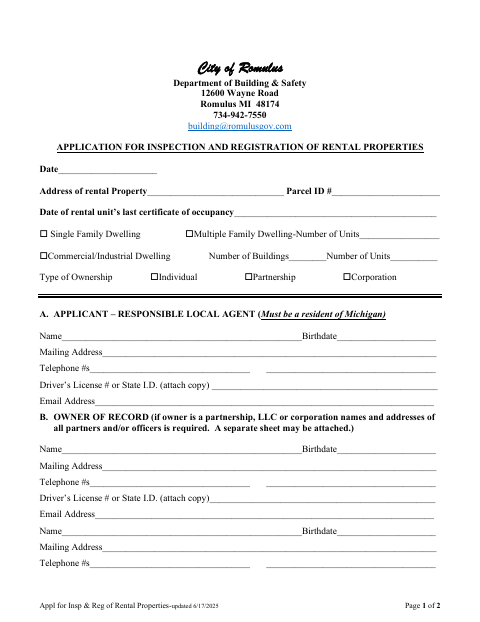
What this form is
The application collects rental property, ownership, responsible local agent, and lessee information, and includes an owner/agent affidavit about the property and the truth of the application. Romulus asks applicants to submit the completed form and a check to the Department of Building & Safety; an inspection is then scheduled. The form also describes registration fees, inspection fees, and possible reinspection fees.
Who needs it
A property owner or responsible local agent applying to register a rental property and arrange its inspection with the City of Romulus should complete this form.
How to get this notarized
- 1
Download the Application
Get the Romulus Application for Inspection and Registration of Rental Properties from the city's website.
- 2
Fill Out the Form
Provide the rental property, applicant, owner, and lessee information, then complete the owner/agent affidavit.
- 3
Book an Online Notary
Arrange a remote notarization for the owner/agent affidavit with a commissioned online notary.
- 4
Sign on Video
Meet the notary by video and sign the affidavit when instructed.
- 5
Submit to the City
Submit the completed form and a check payable to the City of Romulus to the Department of Building & Safety.
Preview the form
The blank PDF straight from Romulus. Look it over, then upload your filled copy to start the notary session.

You’ll need ID and a webcam.
A licensed online notary will join you on video, verify your government-issued ID, witness your signature, and apply their seal. You’ll receive the notarized PDF by email when the session ends.
Frequently asked questions
- How do I complete the notarized affidavit?
- Fill out the application and owner/agent affidavit, then sign the affidavit before a notary. Submit the form and a check to the Romulus Department of Building & Safety.
- Do I need to sign the affidavit in front of a notary?
- Yes. The form's owner/agent affidavit says it is subscribed and sworn before a notary. The owner or agent signing as affiant should wait to sign until meeting the notary.
- Can I use a commissioned online notary?
- Michigan authorizes remote electronic notarization by its notaries. A commissioned online notary can conduct the notarization by video; confirm with the city, village or township if unsure whether it accepts the completed form.
- What should I submit with the application?
- The form instructs applicants to submit the completed application and a check payable to the City of Romulus to the Department of Building & Safety. It says an inspection will then be scheduled.