
Golden Valley, MN · Hennepin County
Conditional Use Permit Plan Application Package
This 12-page package combines a Conditional Use Permit Plan application, checklist, privacy notice, and owner authorization for property owners or authorized applicants seeking city review of a proposed project.
- licensed online notary
- ~15 min average
- Notarized PDF emailed
What you’ll need
- Government-issued photo ID
- Webcam-enabled device (laptop or phone)
- This form, ready to upload as a PDF
What this form is
Golden Valley uses this package to review Conditional Use Permit Plan applications and determine whether required project information and supporting documents have been provided. Applicants must attend a pre-application meeting, complete the applicable forms, and submit the checklist items identified by Planning staff; the package notes that requirements vary by project. A property owner must also complete an Owner Authorization form when an agent applies on the owner's behalf.
Who needs it
Property owners or their authorized agents seeking a Conditional Use Permit Plan review in Golden Valley should complete this package and provide the applicable supporting materials.
Why it needs a notary
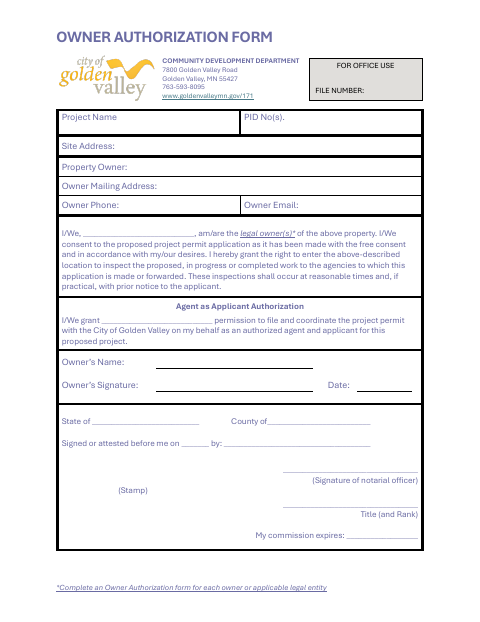
The Owner Authorization form carries a signed-or-attested-before-me jurat block; each applicable property owner signs before the notary and provides the requested owner and property information.
How to get this notarized
- 1
Download The Package
Get the Conditional Use Permit Plan application package from the City of Golden Valley.
- 2
Complete The Forms
Fill out the application, checklist, privacy notice, and an Owner Authorization form for each applicable owner or legal entity.
- 3
Book An Online Notary
Schedule a commissioned online notary for the owner authorization's notarial block.
- 4
Sign On Video
The owner signs the authorization during the online notary session and completes the notarial process.
- 5
Submit To The City
Provide the completed package and applicable project materials to Golden Valley following its submission instructions.
Preview the form
The blank PDF straight from Golden Valley. Look it over, then upload your filled copy to start the notary session.

You’ll need ID and a webcam.
A licensed online notary will join you on video, verify your government-issued ID, witness your signature, and apply their seal. You’ll receive the notarized PDF by email when the session ends.
Frequently asked questions
- Which part of the CUP Plan package needs notarization?
- The Owner Authorization form includes a signed-or-attested-before-me notarial block. The owner completes that form when authorizing an agent to file and coordinate the permit application.
- How do I submit the completed CUP Plan package?
- Follow the package checklist and instructions, including naming files as specified for email submissions. The package says applications may be submitted electronically by emailing the City's Planning Division.
- Do I need an owner authorization form if an agent applies?
- Yes. The package says to complete an Owner Authorization form for each owner or applicable legal entity, and the form lets an owner authorize an agent to apply on their behalf.
- Can I sign the owner authorization with a commissioned online notary?
- Minnesota authorizes remote online notarization for its own notaries, and Minnesota law recognizes notarial acts by an authorized officer of another state. Confirm with the city if unsure.