
Golden Valley, MN · Hennepin County
Owner Authorization Form
This form records a property owner’s consent to a proposed project permit application and authorizes an agent to file and coordinate it with the City of Golden Valley.
- licensed online notary
- ~15 min average
- Notarized PDF emailed
What you’ll need
- Government-issued photo ID
- Webcam-enabled device (laptop or phone)
- This form, ready to upload as a PDF
What this form is
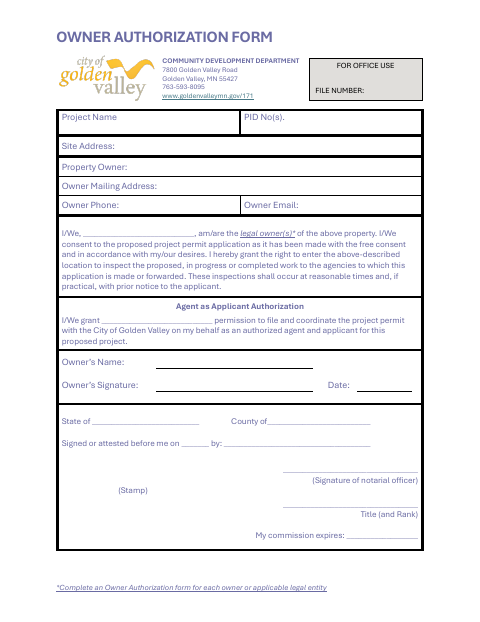
Golden Valley’s Community Development Department uses this form to document the property owner’s consent to a proposed project permit application and grant an agent permission to file and coordinate the permit on the owner’s behalf. The owner also grants specified agencies permission to enter the property to inspect proposed, ongoing, or completed work at reasonable times. The form requests a separate authorization for each owner or applicable legal entity.
Who needs it
Each property owner or applicable legal entity seeking a project permit must complete this form when consenting to the application or authorizing an agent to act on their behalf.
Why it needs a notary
The form has a “Signed or attested before me” notary block; the property owner whose authorization is documented signs before the notary.
How to get this notarized
- 1
Download the Form
Get the Owner Authorization Form from the City of Golden Valley.
- 2
Fill In the Form
Provide the project, property, owner, and agent details, and review the consent and authorization statements.
- 3
Book an Online Notary
Arrange an online notarization for the property owner who will sign the form.
- 4
Sign on Video
Sign before the notary during the online session and complete the notary process.
- 5
Submit to the City
Send the completed form to the City of Golden Valley with the project permit application.
Preview the form
The blank PDF straight from Golden Valley. Look it over, then upload your filled copy to start the notary session.

You’ll need ID and a webcam.
A licensed online notary will join you on video, verify your government-issued ID, witness your signature, and apply their seal. You’ll receive the notarized PDF by email when the session ends.
Frequently asked questions
- How do I complete the Owner Authorization Form?
- Enter the project and property details, provide the owner and agent information, and have the owner sign the form before a notary. Submit the completed form to the City of Golden Valley.
- Do I need to notarize this form?
- The form includes a notary block labeled “Signed or attested before me.” The property owner signs before the notary; confirm with the city if unsure.
- Can I sign this form with an online notary?
- Minnesota authorizes remote online notarization for its own notaries, and state law recognizes notarial acts performed by an authorized officer of another state. Ask the city whether it accepts your notarized form.
- Who should complete a separate authorization form?
- The form instructs applicants to complete one Owner Authorization Form for each owner or applicable legal entity.