
St. Joseph, MO · Buchanan County
Fence, Hedge, and Retaining Wall Permit Application
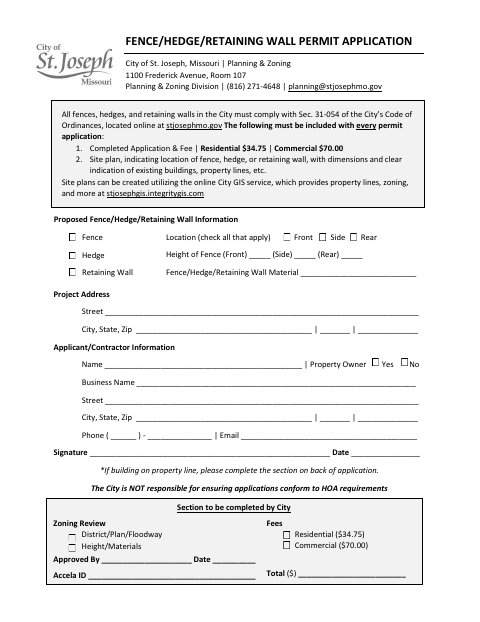
This application requests a City of St. Joseph permit for a fence, hedge, or retaining wall and is filed by the applicant or property owner with Planning & Zoning.
- licensed online notary
- ~15 min average
- Notarized PDF emailed
What you’ll need
- Government-issued photo ID
- Webcam-enabled device (laptop or phone)
- This form, ready to upload as a PDF
What this form is
Use this application to provide the project address, applicant or contractor details, proposed structure type, location, height, material, and applicable fee. The City says each permit application must include a site plan showing the proposed location and dimensions, existing buildings, and property lines. The form also provides fields for additional property owners and adjacent property owners when applicable, plus a section for City review. Contact Planning & Zoning about the application and submission process.
Who needs it
Applicants seeking a City of St. Joseph permit for a fence, hedge, or retaining wall should submit this form with the required fee and site plan.
Why it needs a notary
The form has applicant and property-owner signature fields plus a notary information section for a signature, state, county, date, and commission expiration; it specifies no jurat or acknowledgment.
How to get this notarized
- 1
Download the Application
Get the Fence, Hedge, and Retaining Wall Permit Application from the City of St. Joseph.
- 2
Fill In the Form
Enter project and applicant information, describe the proposed structure, and complete any applicable owner sections.
- 3
Prepare the Site Plan
Include a site plan with the proposed location and dimensions, existing buildings, and property lines.
- 4
Book an Online Notary
Arrange a remote online notarization if needed for the form's notary information section.
- 5
Sign on Video
Follow the commissioned online notary's instructions for signing during the video session.
- 6
Submit to the City
Send the completed application, site plan, and applicable fee to City of St. Joseph Planning & Zoning as directed.
Preview the form
The blank PDF straight from St. Joseph. Look it over, then upload your filled copy to start the notary session.

You’ll need ID and a webcam.
A licensed online notary will join you on video, verify your government-issued ID, witness your signature, and apply their seal. You’ll receive the notarized PDF by email when the session ends.
Frequently asked questions
- How do I complete the Fence, Hedge, and Retaining Wall Permit Application?
- Fill in the project and applicant details, describe the proposed structure, include the required site plan and fee, and complete any applicable additional-owner sections. The form includes a notary information section.
- Do I need a site plan with this application?
- Yes. The form says every permit application must include a site plan showing the proposed location and dimensions, existing buildings, property lines, and related details.
- Can I sign this application with a commissioned online notary?
- Missouri authorizes its notaries to perform remote online notarizations. Ask the City of St. Joseph whether it will accept this application with an online notarization; confirm with the city or town if unsure.
- Where do I submit the completed application?
- The form identifies the City of St. Joseph Planning & Zoning Division at 1100 Frederick Avenue, Room 107. Contact the division to confirm current submission instructions.