
St. Joseph, MO · Buchanan County
Fence Permit Application
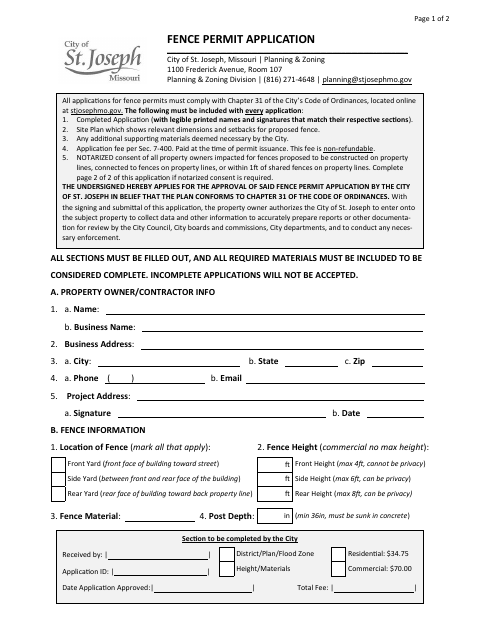
This two-page application requests City of St. Joseph approval for a proposed fence and is filed by the property owner or contractor with Planning & Zoning.
- licensed online notary
- ~15 min average
- Notarized PDF emailed
What you’ll need
- Government-issued photo ID
- Webcam-enabled device (laptop or phone)
- This form, ready to upload as a PDF
What this form is
Use this application to provide property owner or contractor details, the project address, and the proposed fence’s location, height, material, and post depth. The City requires a completed application and site plan; notarized consent from impacted property owners is required when a proposed fence is on a property line, connects to a fence on a property line, or is within one foot of a shared fence.
Who needs it
A property owner or contractor proposing a fence in St. Joseph must submit this application and include notarized consent when the proposal affects shared fences or property lines.
Why it needs a notary
The form includes notarized shared-fence consent blocks; each impacted abutting property owner whose consent is needed signs the consent before a commissioned online notary.
How to get this notarized
- 1
Download the Application
Download the City of St. Joseph Fence Permit Application and review both pages, including the shared-fence consent section.
- 2
Fill Out the Form
Complete the owner or contractor and fence information, and prepare the required site plan and supporting materials.
- 3
Book an Online Notary
If notarized shared-fence consent is required, book a commissioned online notary for the impacted abutting owner’s signature.
- 4
Sign on Video
The abutting owner signs the applicable consent before the notary during the online video session.
- 5
Submit to the City
Submit the completed application, site plan, applicable consent, and other required materials to St. Joseph Planning & Zoning.
Preview the form
The blank PDF straight from St. Joseph. Look it over, then upload your filled copy to start the notary session.

You’ll need ID and a webcam.
A licensed online notary will join you on video, verify your government-issued ID, witness your signature, and apply their seal. You’ll receive the notarized PDF by email when the session ends.
Frequently asked questions
- When does this fence application require notarized consent?
- The form requires notarized consent from impacted property owners for fences on property lines, connected to fences on property lines, or within one foot of shared fences.
- Who signs the shared-fence consent?
- The impacted abutting property owner signs the consent section that applies to the fence. The form provides space for the owner’s signature, date, and notary details.
- How do I submit the completed fence permit application?
- Complete the application, include a site plan and any required notarized consent, and submit the materials to the City of St. Joseph Planning & Zoning. The form says incomplete applications will not be accepted.
- Do I need a notary for every fence permit application?
- No. The form calls for notarized consent only when the proposed fence is on a property line, connects to a fence on a property line, or is within one foot of a shared fence.
- Can I sign the consent with an online notary?
- Missouri authorizes remote online notarization by its notaries under RSMo §486.1100 to §486.1205. Arrange to sign the consent before a commissioned online notary, and confirm with the city or town if unsure.