
Cool Valley, MO · St. Louis County
Liquor License Application and Renewal
This form requests a new or renewed liquor license in Cool Valley and is completed by the applicant seeking to sell or offer intoxicating liquor or non-intoxicating beer in the city.
- licensed online notary
- ~15 min average
- Notarized PDF emailed
What you’ll need
- Government-issued photo ID
- Webcam-enabled device (laptop or phone)
- This form, ready to upload as a PDF
What this form is
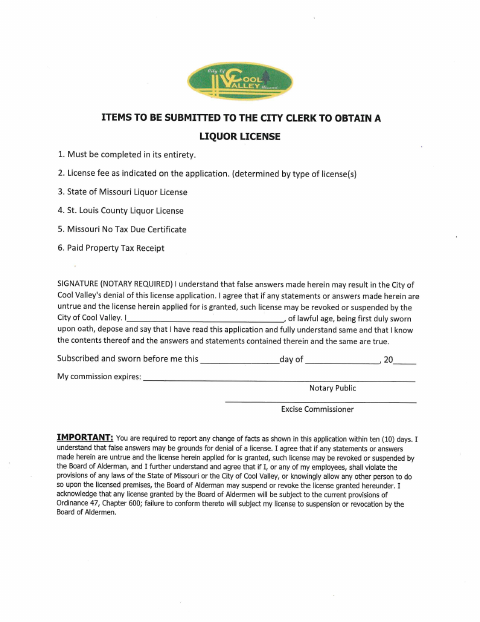
Cool Valley’s form collects business, property, contact, operating-hours, and license-type information for a new liquor license or renewal. The applicant submits the completed form to the City Clerk with the listed materials, including applicable license fees, state and county liquor licenses, a Missouri No Tax Due Certificate, and a paid property tax receipt; the form also requires a sworn signature and warns that changes to application facts must be reported within ten days.
Who needs it
A business applicant seeking a new or renewed license to sell or offer intoxicating liquor or non-intoxicating beer within Cool Valley should complete this form.
Why it needs a notary
The applicant signs the sworn statement before a notary, who completes the form’s subscribed-and-sworn jurat with the date and commission expiration.
How to get this notarized
- 1
Download The Form
Get the liquor license application and renewal form from the City of Cool Valley.
- 2
Fill In The Application
Complete the applicable new or renewal fields and gather the additional items listed for submission to the City Clerk.
- 3
Book An Online Notary
Schedule a remote session with a commissioned online notary to notarize the sworn statement.
- 4
- 5
Submit To The City
Submit the completed application and listed materials to the Cool Valley City Clerk.
Preview the form
The blank PDF straight from Cool Valley. Look it over, then upload your filled copy to start the notary session.

You’ll need ID and a webcam.
A licensed online notary will join you on video, verify your government-issued ID, witness your signature, and apply their seal. You’ll receive the notarized PDF by email when the session ends.
Frequently asked questions
- How do I get the liquor license application notarized?
- Complete the application, then book an online notarization. Sign the sworn statement during a video session with a commissioned online notary, who completes the jurat.
- Do I need to submit anything besides this application?
- The form lists a license fee, state and St. Louis County liquor licenses, a Missouri No Tax Due Certificate, and a paid property tax receipt as items for the City Clerk.
- Does the form require an oath?
- Yes. The applicant swears that the application answers and statements are true, and the form provides a subscribed-and-sworn jurat for the notary.
- Can I notarize this form online?
- Missouri authorizes its notaries to perform remote online notarizations under RSMo §§ 486.1100–486.1205. Confirm with the city or town if unsure whether it accepts an online-notarized application.