
Overland, MO · St. Louis County
Application for Zoning Amendment Approval
Overland’s zoning amendment application is for applicants seeking a zoning map or text change; applicants provide project and property information, attach required materials, and have all signatures notarized.
- licensed online notary
- ~15 min average
- Notarized PDF emailed
What you’ll need
- Government-issued photo ID
- Webcam-enabled device (laptop or phone)
- This form, ready to upload as a PDF
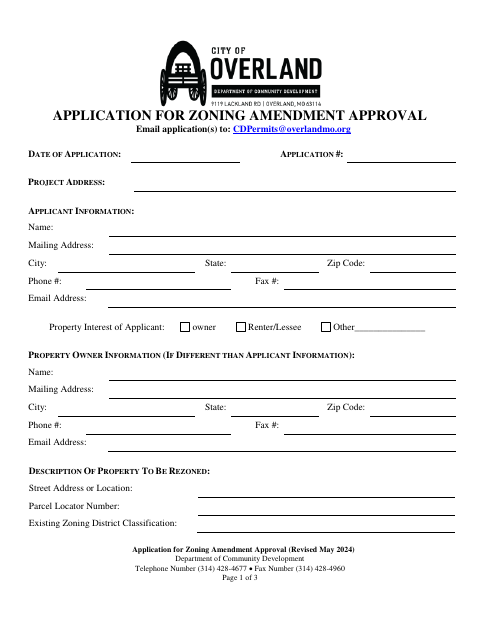
What this form is
Use this three-page application to request a zoning amendment from Overland’s Department of Community Development. It collects applicant and property-owner details, the property location and current and proposed zoning, and the reasons for the request. Map amendments require a licensed surveyor’s legal description, a correlated scaled map, and a list of nearby property owners; text amendments require the existing text and proposed changes. The form says all signatures must be notarized and gives an email address for submitting applications.
Who needs it
Applicants requesting a zoning map or text amendment in Overland must complete the application, provide the applicable attachments, and have all required signatures notarized.
Why it needs a notary
The form includes a subscribed-and-sworn notary block; the applicant and property-owner signatures shown on the application must be notarized.
How to get this notarized
- 1
Download The Application
Get the Application for Zoning Amendment Approval from Overland’s Department of Community Development.
- 2
Fill In The Application
Provide applicant and property-owner details, property information, existing and proposed zoning, and reasons for the requested amendment.
- 3
Prepare Required Attachments
For a map amendment, gather the listed surveyor’s legal description, correlated scaled map, and nearby-owner list. For a text amendment, include existing and proposed text.
- 4
Book An Online Notary
Arrange a remote notarization with a commissioned online notary for all signatures that require notarization.
- 5
Sign On Video
Sign the application during the online notary session and complete the subscribed-and-sworn notarization.
- 6
Submit To The City
Email the completed application and required attachments to [email protected], as directed on the form.
Preview the form
The blank PDF straight from Overland. Look it over, then upload your filled copy to start the notary session.

You’ll need ID and a webcam.
A licensed online notary will join you on video, verify your government-issued ID, witness your signature, and apply their seal. You’ll receive the notarized PDF by email when the session ends.
Frequently asked questions
- How do I submit the completed zoning amendment application?
- The form directs applicants to email applications to [email protected]. Include the required attachments for a map or text amendment and make sure all signatures are notarized.
- Do I need to notarize every signature on the form?
- The application states that all signatures must be notarized. It includes signature lines for the applicant and property owner, as applicable, followed by a subscribed-and-sworn notary block.
- What attachments are required for a zoning map amendment?
- The form lists a legal description by a licensed surveyor, a scaled map correlated with that description and showing the property, and a list of property owners within 300 lineal feet, excluding streets, alleys, and rights-of-way.
- Can I sign this application with a commissioned online notary?
- Missouri authorizes remote online notarization by its notaries under RSMo §486.1100 to §486.1205. A commissioned online notary can notarize the signatures remotely; confirm with the city or town if unsure.