
Anaconda, MT · Deer Lodge County
Marriage License Application
This one-page application records personal and marriage details for two parties applying for a marriage license through the Clerk of Court.
- licensed online notary
- ~15 min average
- Notarized PDF emailed
What you’ll need
- Government-issued photo ID
- Webcam-enabled device (laptop or phone)
- This form, ready to upload as a PDF
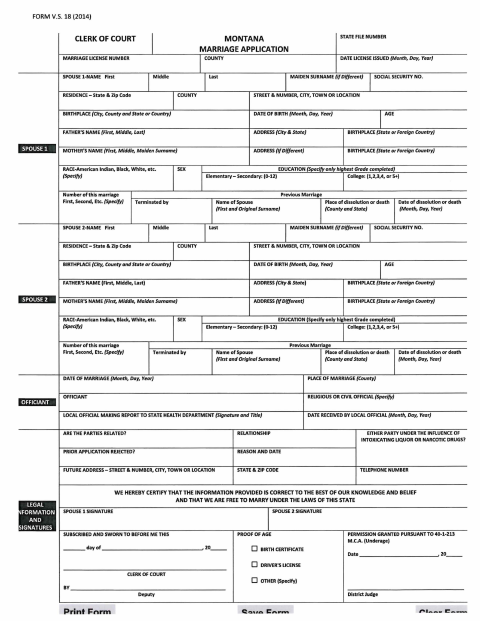
What this form is
The form collects each party’s identifying, residence, birth, and prior-marriage information, along with the planned marriage date and county. Both parties certify that the information is correct and that they are free to marry. The form includes fields for the Clerk of Court and a local official’s report; applicants should check with the appropriate office about submission and any proof-of-age requirements.
Who needs it
Both parties applying for a marriage license complete the application with their personal details and information about the planned marriage.
Why it needs a notary
The form carries a “Subscribed and sworn to before me” jurat, so both parties sign their certification before a commissioned online notary.
How to get this notarized
- 1
Download the Application
Get the one-page Marriage License Application and review its fields before completing it.
- 2
Fill In Both Parties’ Details
Enter the requested personal, residence, family, prior-marriage, and planned-marriage information.
- 3
Book an Online Notary
Arrange a session with a commissioned online notary for the form’s sworn certification.
- 4
Sign on Video
Both parties sign the certification during the online notary session, following the notary’s instructions.
- 5
Submit the Application
Send or deliver the completed application to the appropriate Clerk of Court or local official.
Preview the form
The blank PDF straight from Anaconda. Look it over, then upload your filled copy to start the notary session.

You’ll need ID and a webcam.
A licensed online notary will join you on video, verify your government-issued ID, witness your signature, and apply their seal. You’ll receive the notarized PDF by email when the session ends.
Frequently asked questions
- How do I complete the marriage license application?
- Both parties fill in the requested personal, residence, birth, and marriage details, then sign the certification before a commissioned online notary.
- Do I need to sign the application before a notary?
- Yes. The form includes a “Subscribed and sworn to before me” jurat. Both parties should sign the certification in the notary’s presence.
- Can I use a remote online notary for this form?
- Montana has authorized remote online notarization since 2019. Under §1-5-605 MCA, a notarial act performed in another state by an authorized officer has the same effect as an in-state act.
- Where do I submit the completed application?
- The form identifies the Clerk of Court and includes a local-official reporting section. Ask the appropriate office where to submit your completed application; confirm with the city or town if unsure.