
Lincoln, NH · Grafton County
Elderly Exemption Application
This six-page application and qualifications worksheet lets eligible Lincoln residents request an elderly property tax exemption and provide information about income, assets, residency, and supporting documents.
- licensed online notary
- ~15 min average
- Notarized PDF emailed
What you’ll need
- Government-issued photo ID
- Webcam-enabled device (laptop or phone)
- This form, ready to upload as a PDF
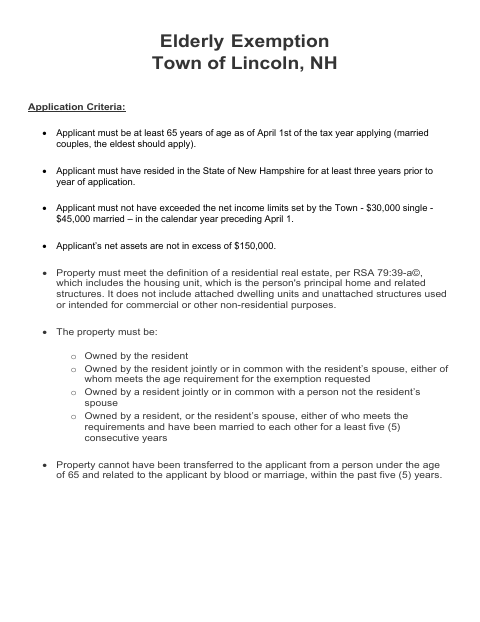
What this form is
Lincoln residents use this application to provide information for an elderly exemption request, including details about income, assets, property ownership, and New Hampshire residency. The town's instructions say to submit the completed worksheet with Form PA-29, Permanent Application for Property Tax Credit/Exemptions; applicants may also need to provide supporting records. The form includes a sworn statement signed before a notary or Justice of the Peace.
Who needs it
Lincoln residents applying for an elderly property tax exemption should complete this worksheet and submit it with Form PA-29 and applicable supporting documents.
Why it needs a notary
The applicant signs the sworn-to-and-subscribed-before-me jurat in front of a notary public or Justice of the Peace.
How to get this notarized
- 1
Download the Application
Get the elderly exemption application and qualifications worksheet from the Town of Lincoln.
- 2
Complete the Form
Fill in the requested information and identify applicable supporting documents.
- 3
Book an Online Notary
Schedule an online notarization for the form's sworn statement.
- 4
Sign on Video
Sign the sworn statement during your online notary session.
- 5
Submit to the Town
Submit the completed worksheet with Form PA-29 and applicable supporting records to the Town of Lincoln.
Preview the form
The blank PDF straight from Lincoln. Look it over, then upload your filled copy to start the notary session.

You’ll need ID and a webcam.
A licensed online notary will join you on video, verify your government-issued ID, witness your signature, and apply their seal. You’ll receive the notarized PDF by email when the session ends.
Frequently asked questions
- How do I complete the elderly exemption application?
- Complete the application and qualifications worksheet, provide the requested income and asset details and applicable supporting documents, then sign the sworn statement before a notary or Justice of the Peace.
- Do I need to submit this worksheet with Form PA-29?
- Yes. The form text says the worksheet is to be completed and submitted along with Form PA-29, Permanent Application for Property Tax Credit/Exemptions.
- Can I sign this form with a commissioned online notary?
- New Hampshire authorizes remote online notarization for its own notaries under RSA 456-B:6-a, effective February 6, 2022; RSA 456-B:4 recognizes notarial acts by authorized officers of another state. Confirm the town will accept your notarized form.
- What supporting documents may be requested?
- The form lists proof of birth, a Social Security benefit statement, and the previous year's federal tax return among documents required for new applicants; it also lists other records that may apply. Confirm with the town if unsure.