
Goffstown, NH · Hillsborough County
Application for Development Review
Goffstown property owners and applicants use this application to request subdivision or site plan review, a conditional use permit, or another listed development review.
- licensed online notary
- ~15 min average
- Notarized PDF emailed
What you’ll need
- Government-issued photo ID
- Webcam-enabled device (laptop or phone)
- This form, ready to upload as a PDF
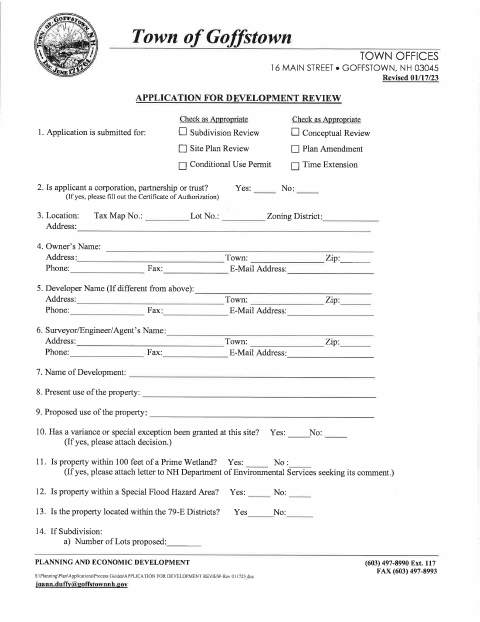
What this form is
This seven-page packet collects project, property, owner, and agent information and includes a checklist, waiver request, fee schedule, and an optional certificate of authorization for a corporation, partnership, or trust. Goffstown asks applicants to complete the checklist for subdivision and site plan applications and submit the applicable plans, supporting materials, and fees. The packet also includes a request form for applicants seeking a Conservation Commission agenda.
Who needs it
Property owners or their authorized applicants seeking Goffstown Planning Board review for a subdivision, site plan, conditional use permit, or other listed development request need this packet.
Why it needs a notary
The optional certificate of authorization has a state jurat; each director, general partner, or trustee signing it must personally appear and swear to the statements before a notary or justice of the peace.
How to get this notarized
- 1
Download The Application
Download Goffstown's Application for Development Review packet and review the application, checklist, fee schedule, and any applicable additional forms.
- 2
Complete The Applicable Sections
Enter project and contact information, complete the relevant checklist items, and prepare required plans and supporting materials.
- 3
Book An Online Notary
If submitting the Certificate of Authorization, book a commissioned online notary for the oath and notarization.
- 4
Sign Before The Notary
The required directors, general partners, or trustees appear by video, sign the certificate, and swear to its statements.
- 5
Submit To Goffstown
Submit the completed application, applicable attachments, and fees to the Town of Goffstown as directed by the town.
Preview the form
The blank PDF straight from Goffstown. Look it over, then upload your filled copy to start the notary session.

You’ll need ID and a webcam.
A licensed online notary will join you on video, verify your government-issued ID, witness your signature, and apply their seal. You’ll receive the notarized PDF by email when the session ends.
Frequently asked questions
- How do I get the Certificate of Authorization notarized?
- If the applicant is a corporation, partnership, or trust, have each required director, general partner, or trustee sign and swear to the certificate before a commissioned online notary or justice of the peace.
- Do I need notarization for the development review application?
- The main application has signature lines but no notary block. The packet's Certificate of Authorization for a corporation, partnership, or trust includes a jurat and requires the signer to swear to the statements.
- Can a commissioned online notary notarize this certificate?
- New Hampshire authorizes remote online notarization by its own notaries under RSA 456-B:6-a, effective February 6, 2022. Arrange for the signer to appear and take the oath by video before a commissioned online notary.
- What should I include with my application?
- The packet lists supporting items on its checklist and describes plan sets and other materials for certain submissions. It also includes a fee schedule; confirm with the town/city if unsure which items apply to your project.