
Goffstown, NH · Hillsborough County
Declaration of Residency Affidavit
This affidavit lets a roommate, parent, or homeowner attest that a new resident lives at a Goffstown address for vehicle registration through the Town Clerk’s Office.
- licensed online notary
- ~15 min average
- Notarized PDF emailed
What you’ll need
- Government-issued photo ID
- Webcam-enabled device (laptop or phone)
- This form, ready to upload as a PDF
What this form is
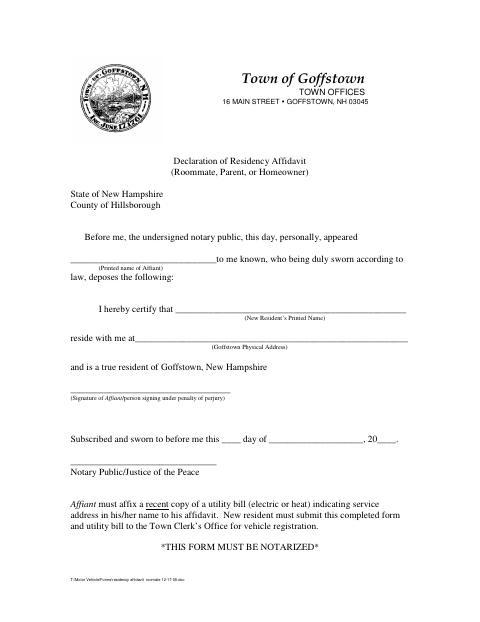
A roommate, parent, or homeowner uses this affidavit to certify that a named new resident lives at a Goffstown physical address. The affiant must attach a recent electric or heat utility bill showing the service address in the affiant’s name. The new resident submits the completed, notarized affidavit and utility bill to the Town Clerk’s Office for vehicle registration.
Who needs it
A new Goffstown resident seeking vehicle registration needs this affidavit completed by a roommate, parent, or homeowner and submitted with the required utility bill.
Why it needs a notary
The form carries a jurat stating it was subscribed and sworn before a notary public or Justice of the Peace; the affiant signs under oath.
How to get this notarized
- 1
Download the Affidavit
Get the Declaration of Residency Affidavit from the Town of Goffstown.
- 2
Fill in the Affidavit
Enter the affiant’s name, the new resident’s name, and the Goffstown physical address.
- 3
Book an Online Notary
Arrange a remote notarization appointment for the affiant.
- 4
Sign on Video
The affiant signs and swears to the statement before the notary during the video session.
- 5
Submit to the Town
Attach a recent qualifying utility bill and submit both documents to the Town Clerk’s Office for vehicle registration.
Preview the form
The blank PDF straight from Goffstown. Look it over, then upload your filled copy to start the notary session.

You’ll need ID and a webcam.
A licensed online notary will join you on video, verify your government-issued ID, witness your signature, and apply their seal. You’ll receive the notarized PDF by email when the session ends.
Frequently asked questions
- How do I submit the residency affidavit for vehicle registration?
- Have a roommate, parent, or homeowner complete and notarize the affidavit. Attach a recent electric or heat utility bill showing the service address in the affiant’s name, then submit both to the Town Clerk’s Office.
- Do I need a utility bill with this affidavit?
- Yes. The form says the affiant must attach a recent electric or heat utility bill showing the service address in the affiant’s name.
- Can I sign this affidavit with a commissioned online notary?
- New Hampshire authorizes remote online notarization for its own notaries under RSA 456-B:6-a, effective February 6, 2022, and RSA 456-B:4 recognizes notarial acts by authorized officers of another state. Confirm acceptance with the Town Clerk’s Office.
- Who can attest to my Goffstown residency?
- The form is for a roommate, parent, or homeowner to certify that the new resident lives at the stated Goffstown physical address. Confirm with the town/city if unsure whether your situation qualifies.