
Oakland, NJ · Bergen County
Soil Permit Application
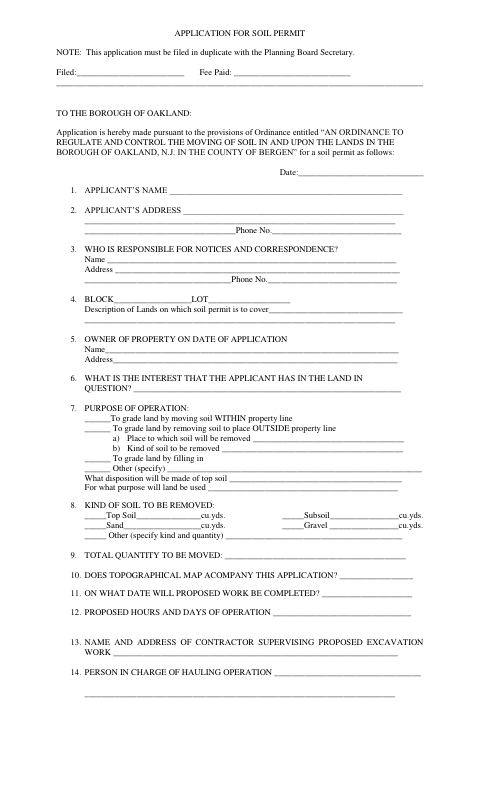
The Soil Permit Application requests information about proposed soil-moving work, and property owners or other applicants file it in duplicate with the Oakland Planning Board Secretary.
- licensed online notary
- ~15 min average
- Notarized PDF emailed
What you’ll need
- Government-issued photo ID
- Webcam-enabled device (laptop or phone)
- This form, ready to upload as a PDF
What this form is
Oakland uses this application to review proposed soil-moving or grading work within the borough. Applicants describe the property, their interest in the land, the purpose and quantity of the work, equipment, hauling routes, work schedule, and measures for controlling dust, erosion, flooding, and other impacts. The form says it must be filed in duplicate with the Planning Board Secretary and includes an applicant signature line above a Notary Public line.
Who needs it
Anyone applying to the Borough of Oakland for a permit to move soil or conduct grading on land in the borough should complete and file this application.
Why it needs a notary
The form has an applicant signature line above a “Notary Public” line, but no jurat or acknowledgment wording; the applicant signs before the notary.
How to get this notarized
- 1
Download The Application
Get the Soil Permit Application from the Borough of Oakland.
- 2
Fill In The Project Details
Complete the applicant, property, soil, schedule, equipment, hauling, and impact-control sections.
- 3
Book An Online Notary
Arrange an appointment with a commissioned online notary for the applicant's signature.
- 4
Sign On Video
Sign the application during the online notary session and follow the notary's instructions.
- 5
Submit The Application
File the completed application in duplicate with the Oakland Planning Board Secretary.
Preview the form
The blank PDF straight from Oakland. Look it over, then upload your filled copy to start the notary session.

You’ll need ID and a webcam.
A licensed online notary will join you on video, verify your government-issued ID, witness your signature, and apply their seal. You’ll receive the notarized PDF by email when the session ends.
Frequently asked questions
- How do I submit the Soil Permit Application?
- Complete the application and file it in duplicate with the Oakland Planning Board Secretary. The form asks for details about the property, proposed work, equipment, hauling, and impact-control measures.
- Do I need to sign this application before a notary?
- The form includes an applicant signature line above a Notary Public line. Sign before a notary, and check with the Planning Board Secretary if you are unsure how to complete the notarial section.
- Can I use an online notary for this form?
- New Jersey permanently authorizes remote online and remote ink notarization for its own notaries. You can book with a commissioned online notary; confirm with the municipality if unsure whether it accepts a remotely notarized application.
- What information should I gather before completing the form?
- Have the property block and lot, applicant and owner details, soil quantities, proposed schedule, contractor and hauling information, and planned erosion, dust, and traffic controls ready.