
Oakland, NJ · Bergen County
Soil Movement Application
This two-page application requests an Oakland soil permit and is completed by an applicant proposing to move soil on or from property in the borough.
- licensed online notary
- ~15 min average
- Notarized PDF emailed
What you’ll need
- Government-issued photo ID
- Webcam-enabled device (laptop or phone)
- This form, ready to upload as a PDF
What this form is
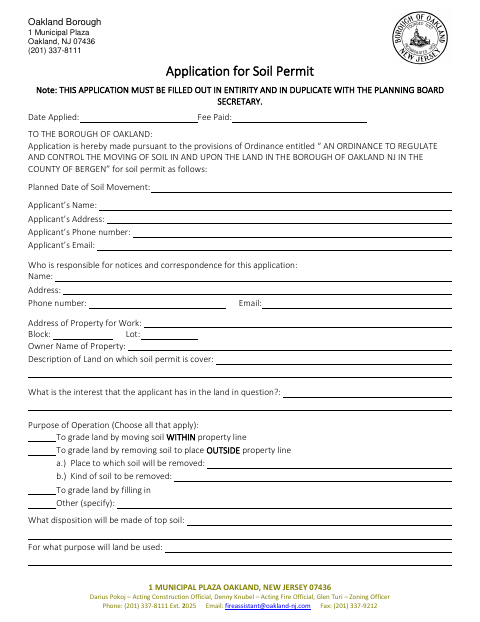
Oakland’s Soil Permit Application asks for details about the property, proposed soil movement, quantities, contractors, hauling, work schedule, and measures such as erosion and dust control. The form says it must be completed in its entirety and submitted in duplicate with the Planning Board Secretary. Applicants also provide a topographical map response and agree to furnish other pertinent information if requested by the Planning Board and Mayor and Council.
Who needs it
An applicant proposing soil movement on property in Oakland should complete this application and submit it in duplicate to the Planning Board Secretary.
Why it needs a notary
The applicant signature area is followed by a Notary Public designation; the applicant signs this form, but it provides no separate jurat or acknowledgment wording.
How to get this notarized
- 1
Download The Application
Get the Soil Movement Application from the Borough of Oakland.
- 2
Complete The Form
Fill out every field, including property, soil quantities, contractor, hauling, and proposed work details.
- 3
Book An Online Notary
Arrange an appointment with a commissioned online notary for the applicant signature.
- 4
Sign On Video
Follow the notary’s instructions and sign during the remote video session.
- 5
Submit To The City
Submit the completed application in duplicate with the Planning Board Secretary.
Preview the form
The blank PDF straight from Oakland. Look it over, then upload your filled copy to start the notary session.

You’ll need ID and a webcam.
A licensed online notary will join you on video, verify your government-issued ID, witness your signature, and apply their seal. You’ll receive the notarized PDF by email when the session ends.
Frequently asked questions
- How do I submit the Soil Movement Application?
- Complete the application in its entirety and submit it in duplicate with the Planning Board Secretary, as directed on the form.
- Do I need to provide a topographical map?
- The form asks whether a topographical map accompanies the application; answer yes or no. Confirm with the municipality if unsure.
- Does the applicant sign before a notary?
- The applicant signature area is followed by a Notary Public designation. The form does not provide separate jurat or acknowledgment wording, so check with the municipality about its expectations.
- Can I use an online notary for this form?
- New Jersey permanently authorizes remote online notarization and remote ink notarization for its own notaries. A commissioned online notary can notarize remotely; confirm with the municipality if unsure.
Soil Movement Application in other Bergen County cities
Each city publishes its own version of this form. Pick the city where you’re filing.