
Voorhees, NJ · Camden County
Shared Barrier for Swimming Pools
The Shared Barrier for Swimming Pools form records fence-owner and pool-owner acknowledgments when a Voorhees resident relies on a neighboring fence as a swimming-pool barrier.
- licensed online notary
- ~15 min average
- Notarized PDF emailed
What you’ll need
- Government-issued photo ID
- Webcam-enabled device (laptop or phone)
- This form, ready to upload as a PDF
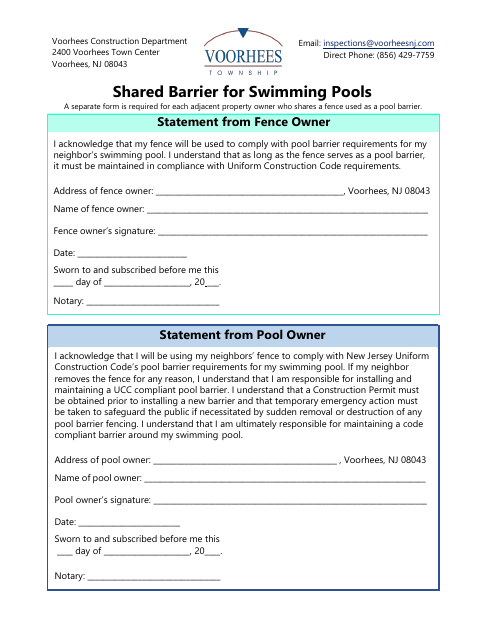
What this form is
This form records the fence owner’s agreement to let a neighboring pool owner use the fence as a pool barrier, along with both owners’ responsibilities if the fence is removed or fails to meet requirements. Voorhees requires a separate form for each adjacent property owner sharing a fence used as a pool barrier. The pool owner also acknowledges responsibility for a compliant barrier and the need for a construction permit before installing a replacement.
Who needs it
Adjacent Voorhees fence owners and swimming-pool owners must complete the form when the pool owner relies on the neighbor’s fence to serve as a pool barrier.
Why it needs a notary
The form has a jurat for each owner: both the fence owner and pool owner sign and swear to their respective statements before a notary.
How to get this notarized
- 1
Download the Form
Get the Shared Barrier for Swimming Pools form from the Voorhees Construction Department.
- 2
Fill Out Both Statements
The fence owner and pool owner each complete their details and acknowledgment.
- 3
Book an Online Notary
Arrange a remote appointment with a commissioned online notary for both owners’ sworn statements.
- 4
Sign on Video
Each owner signs the appropriate statement before the notary during the online session.
- 5
Submit to the City
Send the notarized form to the Voorhees Construction Department using its accepted submission method.
Preview the form
The blank PDF straight from Voorhees. Look it over, then upload your filled copy to start the notary session.

You’ll need ID and a webcam.
A licensed online notary will join you on video, verify your government-issued ID, witness your signature, and apply their seal. You’ll receive the notarized PDF by email when the session ends.
Frequently asked questions
- How do I complete and submit the shared pool barrier form?
- Have the fence owner and pool owner fill out their respective statements, sign each before a notary, then submit the completed form to the Voorhees Construction Department.
- Do I need to notarize both owners’ statements?
- Yes. The form has a separate sworn-and-subscribed jurat for the fence owner’s statement and the pool owner’s statement, with a notary signature line for each.
- Can I use an online notary for this form?
- New Jersey permits remote online notarization and remote ink notarization by its notaries. You can book a commissioned online notary to notarize the owners’ signatures remotely.
- Where do I send the completed form?
- The form lists the Voorhees Construction Department and its email address, [email protected]. Contact the department about how it accepts completed forms; confirm with the municipality if unsure.