
Waterford Township, NJ · Camden County
Zoning Permit Application and Property Owner Survey Affidavit
This two-page form combines a zoning permit application with a property-owner survey affidavit for Waterford Township residents proposing construction or other property work requiring zoning review.
- licensed online notary
- ~15 min average
- Notarized PDF emailed
What you’ll need
- Government-issued photo ID
- Webcam-enabled device (laptop or phone)
- This form, ready to upload as a PDF
What this form is
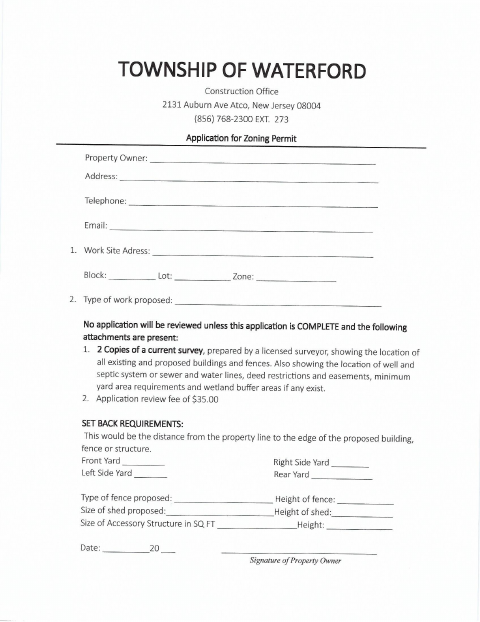
Waterford Township’s Construction Office uses this application to review proposed work for zoning compliance. Applicants provide property and project details, setback measurements, and a current survey with required site information, and pay the stated $35 review fee. The second page is a property-owner statement explaining that the owner marked the survey to show the proposed location of a fence, shed, pool, deck, addition, garage, or other work.
Who needs it
Property owners proposing work that requires a Waterford Township zoning permit should complete the application and provide the requested survey and supporting materials.
Why it needs a notary
The second-page owner statement carries a “Sworn to and subscribed before me” jurat; the property owner signs that statement before the notary.
How to get this notarized
- 1
Download the Form
Get the Waterford Township zoning permit application and property-owner survey affidavit.
- 2
Complete the Application
Fill in the property, contact, proposed-work, setback, and structure details, and prepare the requested survey and fee.
- 3
Book an Online Notary
Schedule a session with a commissioned online notary for the sworn property-owner statement.
- 4
Sign on Video
Sign the owner statement during the online session when instructed by the notary.
- 5
Submit to the Township
Send the completed application, signed statement, required survey copies, and review fee to the Waterford Township Construction Office.
Preview the form
The blank PDF straight from Waterford Township. Look it over, then upload your filled copy to start the notary session.

You’ll need ID and a webcam.
A licensed online notary will join you on video, verify your government-issued ID, witness your signature, and apply their seal. You’ll receive the notarized PDF by email when the session ends.
Frequently asked questions
- How do I complete the notarized statement?
- Complete the application and owner statement, then book an online notary. Sign the owner statement during the video session when directed, and submit the completed form and required attachments to the township.
- Do I need to notarize the entire application?
- The form’s notary block appears beneath the second-page property-owner statement. The application’s first page has a property-owner signature line but no notary block; confirm with the municipality if unsure.
- Can I use an online notary for this form?
- New Jersey permanently authorizes remote online notarization for its own notaries. You can sign the sworn statement before a commissioned online notary, subject to acceptance by the township.
- What should I include with the application?
- The form calls for two copies of a current survey prepared by a licensed surveyor, with specified site details, and a $35 application review fee. Incomplete applications without the attachments will not be reviewed.