
South Orange, MT · Essex County
Lot Coverage Worksheet
Property owners and applicants use this worksheet to report existing, removed, and proposed surface areas and calculate lot coverage for an application.
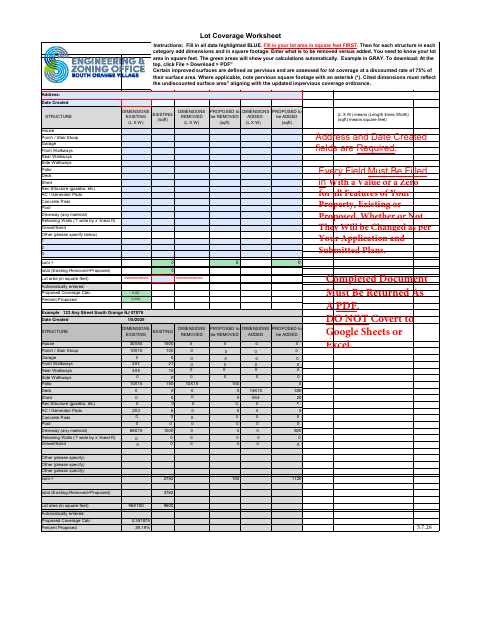
What this form is
The Lot Coverage Worksheet records the lot area and dimensions and square footage for property features, including structures, walkways, patios, and driveways. It shows existing, removed, and proposed coverage and calculates the proposed coverage total and percentage. The instructions say to fill in every field with a value or zero, use submitted plans, and return the completed worksheet as a PDF.
Who needs it
Applicants with property features to report use the worksheet to calculate lot coverage in connection with their application and submitted plans.
How to submit it
Submit it to the city department named on the form; check the city website for current contact details.
About notarization
This worksheet is completed without a notary; it requires an address and date created, and the completed document must be returned as a PDF.
How to submit this form
- 1
Download The Worksheet
Download the Lot Coverage Worksheet PDF.
- 2
Complete The Worksheet
Enter the address, date created, lot area, and dimensions and square footage for each feature; fill every field with a value or zero.
- 3
Check Property Areas
Use your application and submitted plans to report existing, removed, and proposed areas. Mark applicable pervious square footage with an asterisk.
- 4
Return The PDF
Return the completed worksheet as a PDF; check the South Orange city website for current submission contact details.
Frequently asked questions
- What does the Lot Coverage Worksheet calculate?
- It totals existing coverage, subtracts areas to be removed, adds proposed areas, and calculates the proposed coverage percentage using the lot area.
- What information do I enter on the worksheet?
- Enter the address, date created, lot area in square feet, and dimensions and square footage for each listed feature. Use a value or zero for every feature.
- Do I need a notary for the Lot Coverage Worksheet?
- No. This worksheet is completed without a notary; it requires an address and date created, and the completed document must be returned as a PDF.
- How do I submit the Lot Coverage Worksheet?
- Return the completed worksheet as a PDF. The form does not specify a submission address or department, so check the South Orange city website for current contact details.
Need something notarized?
This Lot Coverage Worksheet doesn’t need a notary — but if you have another South Orange form that does, a commissioned online notary can help.