
East Brunswick, NJ · Middlesex County
Hotel/Motel License Application
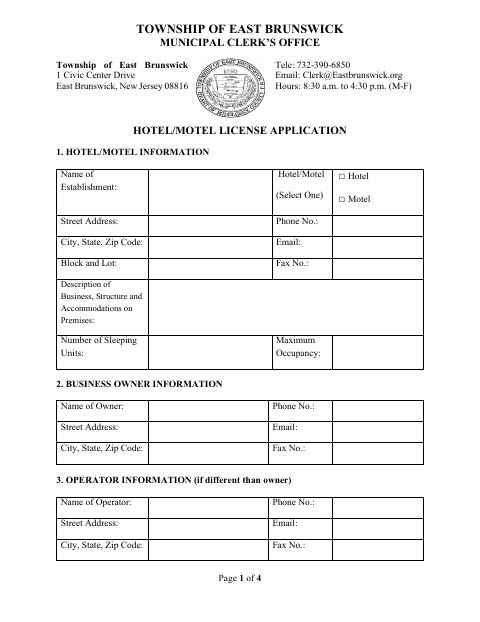
This application provides the Township of East Brunswick with hotel or motel, owner, operator, registered agent, and attorney details for a hotel or motel license.
- licensed online notary
- ~15 min average
- Notarized PDF emailed
What you’ll need
- Government-issued photo ID
- Webcam-enabled device (laptop or phone)
- This form, ready to upload as a PDF
What this form is
Use this four-page application to provide establishment details, sleeping-unit count, maximum occupancy, and contact information for the owner and other listed parties. The applicant must answer questions about prior hotel or motel licenses, denials or revocations, and arrests or convictions, and describe relevant circumstances when applicable. The owner or legal agent signs the application before a notary; the Township also has approval fields for municipal officials.
Who needs it
An applicant seeking a Township of East Brunswick hotel or motel license must complete the application and provide the requested establishment and applicant information.
Why it needs a notary
The form includes a sworn-and-subscribed jurat stating the signer appeared before the notary; the owner or legal agent signs voluntarily before the notary.
How to get this notarized
- 1
Download The Application
Get the Hotel/Motel License Application from the Township of East Brunswick.
- 2
Fill Out The Form
Complete the establishment, owner, operator, agent, and attorney sections, and answer the applicant-history questions.
- 3
Book An Online Notary
Arrange a remote notarization for the owner or legal agent’s signature.
- 4
Sign On Video
Sign voluntarily before the notary, who completes the jurat and notary fields.
- 5
Submit To The Township
Send the completed application to the East Brunswick Municipal Clerk’s Office.
Preview the form
The blank PDF straight from East Brunswick. Look it over, then upload your filled copy to start the notary session.

You’ll need ID and a webcam.
A licensed online notary will join you on video, verify your government-issued ID, witness your signature, and apply their seal. You’ll receive the notarized PDF by email when the session ends.
Frequently asked questions
- How do I complete the notarized signature?
- Fill out the application, then sign as owner or legal agent in front of the notary. The form includes a sworn-and-subscribed jurat and spaces for the notary’s signature, commission expiration, and seal.
- Do I need to notarize the application?
- Yes. The application has a notary block stating that the signer swore and subscribed before the notary, and it identifies the owner or legal agent’s signature.
- Can I use an online notary for this application?
- New Jersey has permanently authorized remote online notarization and remote ink notarization for its notaries since October 2021. A commissioned online notary can notarize the signature remotely; confirm with the municipality if unsure.
- What information does the application request?
- It requests hotel or motel details, sleeping units, maximum occupancy, owner and other contact information, prior license history, and information about license denials, revocations, arrests, or convictions.
Other forms in East Brunswick
Affidavit of Public Service
East Brunswick
Going-Out-of-Business Sale Application
East Brunswick
Application for Health Spa License
East Brunswick
Planning and Zoning Development Application
East Brunswick
Precious Metals, Jewels, and Secondhand Dealer Purchase Application
East Brunswick
Retail Electronic Smoking Device Establishments Application
East Brunswick