
Long Beach Township, NJ · Ocean County
Declaration of Deed Restriction
This declaration places a continuing flood-regulation restriction on Long Beach Township property and is completed by the property owner for recording with the Ocean County Clerk.
- licensed online notary
- ~15 min average
- Notarized PDF emailed
What you’ll need
- Government-issued photo ID
- Webcam-enabled device (laptop or phone)
- This form, ready to upload as a PDF
What this form is
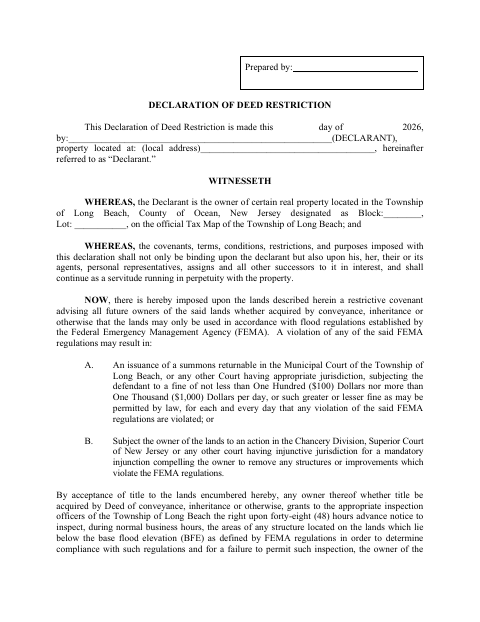
The declaration places a covenant on the identified property requiring current and future owners to use the land in accordance with FEMA flood regulations. It also describes possible penalties for violations and grants Township inspection officers access, with advance notice, to areas below the base flood elevation. The owner signs the instrument and directs that it be recorded with the Ocean County Clerk.
Who needs it
The property owner identified as the declarant completes this form to place the stated flood-regulation restriction on the property and direct that the instrument be recorded.
Why it needs a notary
The form carries a personal-appearance acknowledgment stating the signer made and executed the instrument; the declarant must appear before the notary and acknowledge signing it.
How to get this notarized
- 1
Download The Form
Download the Declaration of Deed Restriction for the Long Beach Township property.
- 2
Fill In Property Details
Enter the declarant, property address, block and lot, and other requested details.
- 3
Book An Online Notary
Schedule a session with a commissioned online notary and have identification ready.
- 4
Acknowledge Your Signature
Appear on video and acknowledge to the notary that you made and executed the instrument.
- 5
Submit For Recording
Arrange to record the completed instrument with the Ocean County Clerk.
Preview the form
The blank PDF straight from Long Beach Township. Look it over, then upload your filled copy to start the notary session.

You’ll need ID and a webcam.
A licensed online notary will join you on video, verify your government-issued ID, witness your signature, and apply their seal. You’ll receive the notarized PDF by email when the session ends.
Frequently asked questions
- How do I notarize this deed restriction online?
- Complete the form, book a session with a commissioned online notary, and sign or acknowledge it during the video session. Arrange recording with the Ocean County Clerk afterward.
- Do I need to sign in front of a notary?
- Yes. The form includes an acknowledgment stating that the signer personally appeared and confirmed making and executing the instrument. Sign or acknowledge it before the notary.
- Can I use remote online notarization for this form?
- New Jersey has permanently authorized remote online notarization and remote ink notarization for its own notaries since October 2021. An authorized officer performing a notarial act in another state has the same effect under N.J.S.A. 52:7-10.14.
- How do I record the signed declaration?
- The form directs that the instrument be recorded with the Ocean County Clerk. Counties may support e-recording, usually through a title company; confirm the submission process with the Clerk or municipality if unsure.
Other forms in Long Beach Township
Declaration of Deed Restriction in other Ocean County cities
Each city publishes its own version of this form. Pick the city where you’re filing.