
Toms River, NJ · Ocean County
Foreclosure Property Registration Form
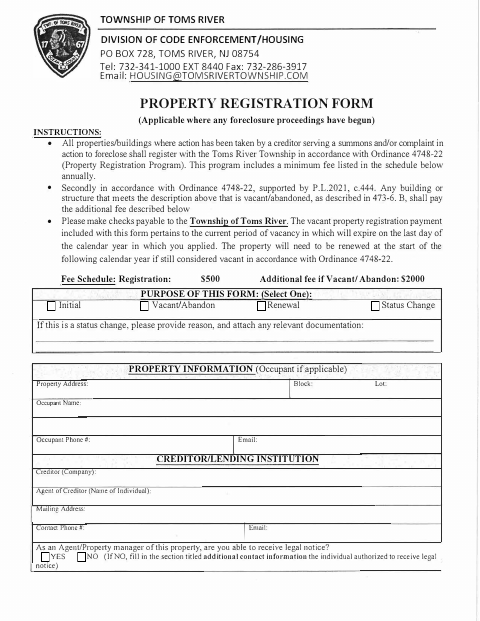
Toms River uses this form to register properties where foreclosure proceedings have begun; the creditor, agent, property manager, or other applicant provides property and contact details and certifies the information.
- licensed online notary
- ~15 min average
- Notarized PDF emailed
What you’ll need
- Government-issued photo ID
- Webcam-enabled device (laptop or phone)
- This form, ready to upload as a PDF
What this form is
Use this form to register a property or building after a creditor has served a summons or complaint in a foreclosure action. The form covers initial registration, vacant or abandoned property, renewals, and status changes, and asks for property, creditor, property manager, and legal-notice contact information. Toms River requires annual registration under the instructions, with an additional fee for qualifying vacant or abandoned properties; applicants certify the information and agree to report changes.
Who needs it
A creditor, agent, property manager, or other applicant must file when a creditor has served a summons or complaint in an action to foreclose on the property.
Why it needs a notary
The form includes a notarial certificate stating the applicant swore and acknowledged the instrument; the applicant signs and appears before the notary.
How to get this notarized
- 1
Download The Form
Get the Property Registration Form from the Toms River Township website.
- 2
Fill In The Details
Complete the applicable purpose, property, creditor, contact, and certification fields; attach relevant documents for a status change.
- 3
Book An Online Notary
Arrange a remote appointment with a commissioned online notary before signing the certification.
- 4
Sign On Video
Appear for the online notarization and sign when instructed by the notary.
- 5
Submit To The Township
Send the completed form and applicable payment to Toms River Township according to its submission instructions.
Preview the form
The blank PDF straight from Toms River. Look it over, then upload your filled copy to start the notary session.

You’ll need ID and a webcam.
A licensed online notary will join you on video, verify your government-issued ID, witness your signature, and apply their seal. You’ll receive the notarized PDF by email when the session ends.
Frequently asked questions
- How do I submit the Toms River Property Registration Form?
- Complete the form, sign its certification before a notary, and submit it to the Township of Toms River with the applicable payment. Contact the Township for delivery instructions.
- Do I need to notarize this property registration form?
- Yes. The form includes a notarial certificate stating that the applicant swore and acknowledged the instrument, so the applicant must appear before a notary to sign.
- Can I sign the form with an online notary?
- New Jersey has permanently authorized remote online notarization and remote ink notarization for its own notaries since October 2021. A commissioned online notary can notarize your signature remotely.
- When is this form required?
- The form says properties where a creditor has served a summons or complaint in a foreclosure action must register. It also provides for vacant or abandoned registrations, renewals, and status changes.