
Montgomery Township, NJ · Somerset County
Campaign Contributions Affidavit
This affidavit documents a contractor’s campaign contribution affirmation and business ownership disclosures for a contract with Montgomery Township, and is completed by an authorized contractor representative.
- licensed online notary
- ~15 min average
- Notarized PDF emailed
What you’ll need
- Government-issued photo ID
- Webcam-enabled device (laptop or phone)
- This form, ready to upload as a PDF
What this form is
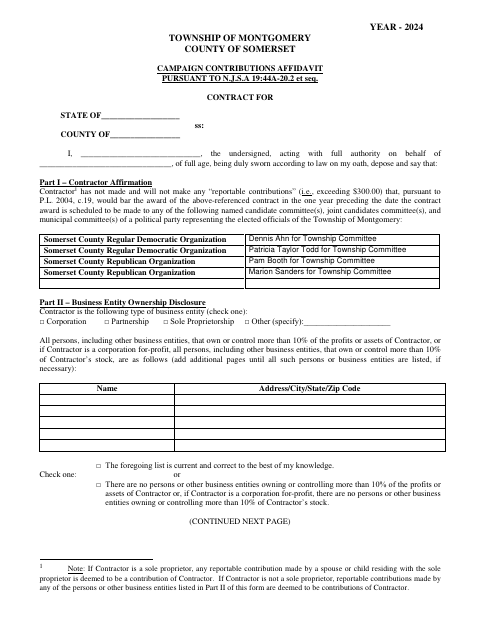
Montgomery Township’s two-page affidavit asks a contractor to affirm information about reportable political contributions and identify people or business entities with more than 10% ownership or control. The contractor’s authorized representative completes the business and ownership sections, then signs the attestation under oath. The form is used in connection with a Township contract and includes a notarial jurat for the signature.
Who needs it
A contractor seeking or holding a Montgomery Township contract needs an authorized representative to complete and submit this affidavit with the requested contract paperwork.
How to get this notarized
- 1
Download The Affidavit
Download the Campaign Contributions Affidavit PDF from Montgomery Township.
- 2
Fill In The Contractor Details
Complete the contractor, contribution affirmation, business type, and ownership disclosure sections.
- 3
Book An Online Notary
Arrange a session with a commissioned online notary and have identification ready.
- 4
Sign On Video
Take the oath and sign the attestation during the online notarization session.
- 5
Submit It To The Township
Send the notarized affidavit with the related contract paperwork according to Township instructions.
Preview the form
The blank PDF straight from Montgomery Township. Look it over, then upload your filled copy to start the notary session.

You’ll need ID and a webcam.
A licensed online notary will join you on video, verify your government-issued ID, witness your signature, and apply their seal. You’ll receive the notarized PDF by email when the session ends.
Frequently asked questions
- How do I complete the campaign contributions affidavit?
- Identify the contractor and authorized affiant, complete the contribution affirmation and ownership disclosures, then sign the attestation before a notary. Submit the completed affidavit with the Township contract paperwork.
- Do I need to sign this affidavit in front of a notary?
- Yes. The form includes a “Subscribed and sworn to before me” jurat, so the affiant should sign the attestation in the notary’s presence and take an oath.
- Can I use an online notary for this form?
- New Jersey permanently authorizes remote online notarization and remote ink notarization for its notaries. You can book a commissioned online notary to complete the oath and notarization by video.
- Who should complete the ownership disclosure?
- The contractor must identify people or business entities owning or controlling more than 10% of the profits or assets, or more than 10% of a for-profit corporation’s stock. Check the no-owners option if applicable.
- Where do I submit the completed affidavit?
- Submit it with the related contract paperwork to Montgomery Township. Follow the Township’s instructions for delivery and confirm with the municipality if unsure.