
Fanwood, MT · Union County
Alarm Device Registration Application
Fanwood property owners or tenants use this application to provide information about an alarm device and its installation, monitoring, and emergency contacts.
What this form is
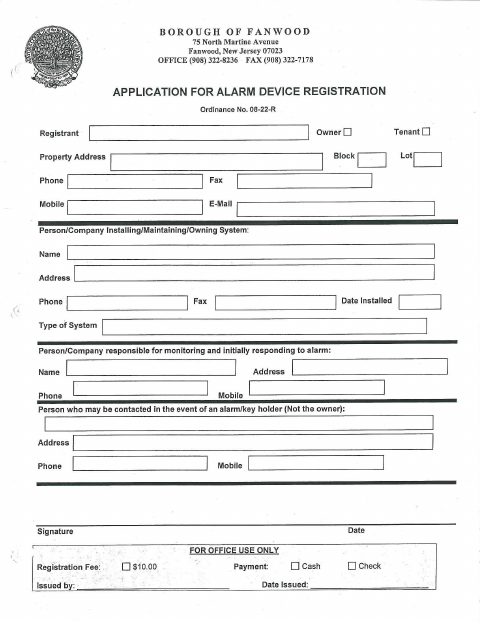
This application records alarm device registration information for a property in Fanwood. It asks for the registrant’s contact details, property address and block and lot numbers, system type and installation date, installer or system contact information, monitoring and initial response details, and a key holder’s contact information; it also includes a $10 registration fee field for office use.
Who needs it
A property owner or tenant registering an alarm device in Fanwood can complete the application with property, system, and contact information.
How to submit it
The form does not specify a submission method. Submit it to the city department named on the form; check the city website for current contact details.
About notarization
This document is signed without a notary; the signer just signs and dates the application.
How to submit this form
- 1
Download The Application
Download the Alarm Device Registration Application PDF.
- 2
Complete The Application
Enter the registrant and property details, alarm system information, installer or monitoring contacts, and key holder information.
- 3
Review And Sign
Review the completed application, then sign and date it.
- 4
Submit To The Borough
Submit it to the city department named on the form; check the city website for current contact details.
Frequently asked questions
- Who can complete the Alarm Device Registration Application?
- The form identifies the registrant as an owner or tenant and requests property, alarm system, and contact information.
- What information does the alarm registration application request?
- It asks for the property address, block and lot, system type and installation date, installer or system contact information, monitoring details, and a key holder’s contact information.
- Do I need a notary for the Alarm Device Registration Application?
- No. This document is signed without a notary; the signer just signs and dates the application.
- How do I submit the Alarm Device Registration Application?
- The form does not specify a submission method. Submit it to the city department named on the form; check the city website for current contact details.
Need something notarized?
This Alarm Device Registration Application doesn’t need a notary — but if you have another Fanwood form that does, a commissioned online notary can help.