
Hobbs, NM · Lea County
Mobile Business License Application and Affidavit
This application and affidavit collects personal, business, vehicle, and residency details from people seeking a City of Hobbs mobile business license and business registration.
- licensed online notary
- ~15 min average
- Notarized PDF emailed
What you’ll need
- Government-issued photo ID
- Webcam-enabled device (laptop or phone)
- This form, ready to upload as a PDF
What this form is
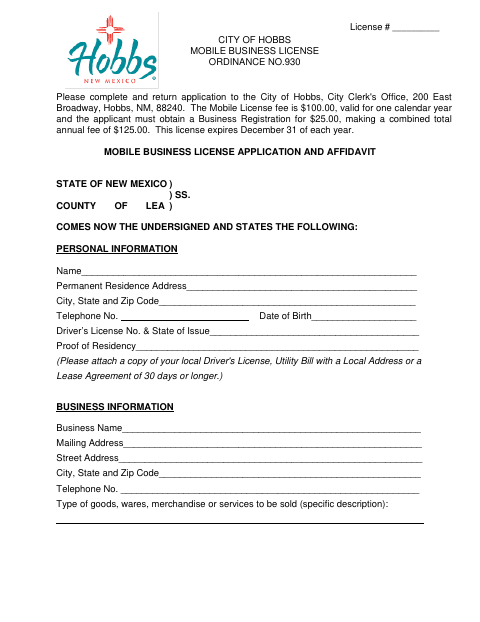
The form gathers applicant and business information, a specific description of goods or services, vehicle details, and proof of local residency. The City of Hobbs directs applicants to return it to the City Clerk's Office; the form states the mobile license costs $100, lasts one calendar year, and requires a $25 business registration. It says the license expires December 31 each year and the application must be signed before a notary.
Who needs it
People applying to sell goods or services as a mobile business within Hobbs's municipal limits must submit this application and provide the requested business and residency information.
Why it needs a notary
The applicant signs the application before a notary, who completes the subscribed-and-sworn jurat, including the date, official title, and commission-expiration date.
How to get this notarized
- 1
Download the Application
Get the Mobile Business License Application and Affidavit from the City of Hobbs.
- 2
Fill In the Form
Complete the personal, business, vehicle, and residency sections, and gather the requested supporting documents.
- 3
Book an Online Notary
Schedule a session with a commissioned online notary before signing the application.
- 4
Sign on Video
Sign the application during the online notarization session so the notary can complete the jurat.
- 5
Submit to the City
Return the completed application and supporting documents to the Hobbs City Clerk's Office.
Preview the form
The blank PDF straight from Hobbs. Look it over, then upload your filled copy to start the notary session.

You’ll need ID and a webcam.
A licensed online notary will join you on video, verify your government-issued ID, witness your signature, and apply their seal. You’ll receive the notarized PDF by email when the session ends.
Frequently asked questions
- How do I apply for a Hobbs mobile business license?
- Complete the application, attach proof of local residency and business tax ID, sign it before a notary, and return it to the City Clerk's Office at the address shown on the form.
- Do I need to sign the application before a notary?
- Yes. The form says the application must be signed before a notary and includes a subscribed-and-sworn jurat for the notary to complete.
- Can I use a commissioned online notary?
- New Mexico law authorizes remote online notarization by its notarial officers, and recognizes notarial acts performed by authorized officers or individuals of another state. Confirm the city will accept your notarized application.
- What should I include with the application?
- The form requests proof of residency, such as a local driver's license, utility bill with a local address, or lease agreement of 30 days or longer, plus proof of your business tax ID.
- Where should I submit the completed form?
- The form directs applicants to return it to the City of Hobbs, City Clerk's Office, at 200 East Broadway, Hobbs, NM 88240. Confirm with the city or county clerk if unsure.