
Plandome Heights, NY · Nassau County
Affidavit for Change of Licensed Contractor
This affidavit lets a property owner request a change to the licensed contractor on a permit and is submitted to the Village of Plandome Heights with the new contractor’s application.
- licensed online notary
- ~15 min average
- Notarized PDF emailed
What you’ll need
- Government-issued photo ID
- Webcam-enabled device (laptop or phone)
- This form, ready to upload as a PDF
What this form is
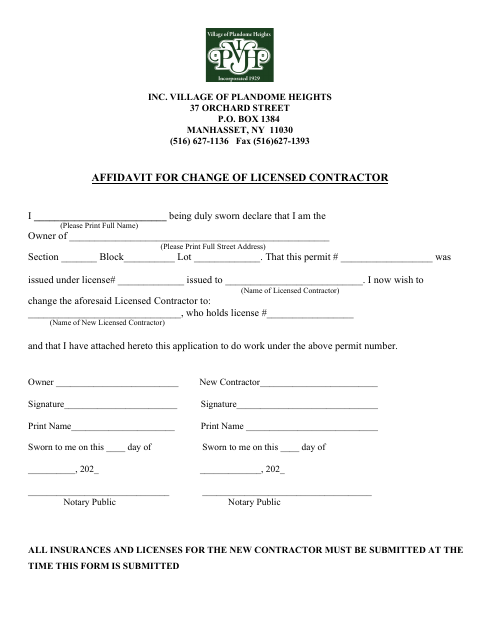
The affidavit identifies the property, permit, current licensed contractor, and proposed replacement contractor. The owner and new contractor provide signatures under separate sworn statements. Submit the form with the new contractor’s application to work under the permit; the form says all insurance documents and licenses for the new contractor must be submitted at the same time.
Who needs it
A property owner requesting a change of licensed contractor on a Plandome Heights permit and the new contractor named in the request need to complete this affidavit.
Why it needs a notary
The form has separate sworn-to jurat blocks for the owner and new contractor; both sign their statements before a notary public.
How to get this notarized
- 1
Download the Affidavit
Get the Affidavit for Change of Licensed Contractor from the Village of Plandome Heights.
- 2
Fill In the Form
Enter the owner, property, permit, current contractor, and new contractor information.
- 3
Book an Online Notary
Arrange a remote notarization for the owner and new contractor’s sworn statements.
- 4
Sign on Video
Both sign their statements during the online notary session and complete the notarial process.
- 5
Submit to the Village
Submit the affidavit with the new contractor’s application, insurance documents, and licenses.
Preview the form
The blank PDF straight from Plandome Heights. Look it over, then upload your filled copy to start the notary session.

You’ll need ID and a webcam.
A licensed online notary will join you on video, verify your government-issued ID, witness your signature, and apply their seal. You’ll receive the notarized PDF by email when the session ends.
Frequently asked questions
- How do I submit the contractor change affidavit?
- Complete the owner and new contractor sections, have both sworn statements notarized, and submit the affidavit with the new contractor’s application. Include the new contractor’s insurance documents and licenses.
- Do I need both the owner and new contractor to sign?
- Yes. The form has separate signature and sworn-to sections for the owner and the new contractor, each with a Notary Public block.
- Can I sign this affidavit with a commissioned online notary?
- New York authorizes its notaries to perform remote online notarizations under Executive Law §135-c, effective since 2023. Check that the notarization meets the Village’s submission requirements.
- What should I do if I am unsure about submission requirements?
- The form says the new contractor’s insurance and licenses must be submitted with the affidavit. Confirm with the city, town or village if unsure.