
Ballston, NY · Saratoga County
Owner Authorization for Zoning Board of Appeals Review
This form authorizes a named person to bring an appeal application before the Town of Ballston Zoning Board of Appeals and permits town representatives to access the property for review.
- licensed online notary
- ~15 min average
- Notarized PDF emailed
What you’ll need
- Government-issued photo ID
- Webcam-enabled device (laptop or phone)
- This form, ready to upload as a PDF
What this form is
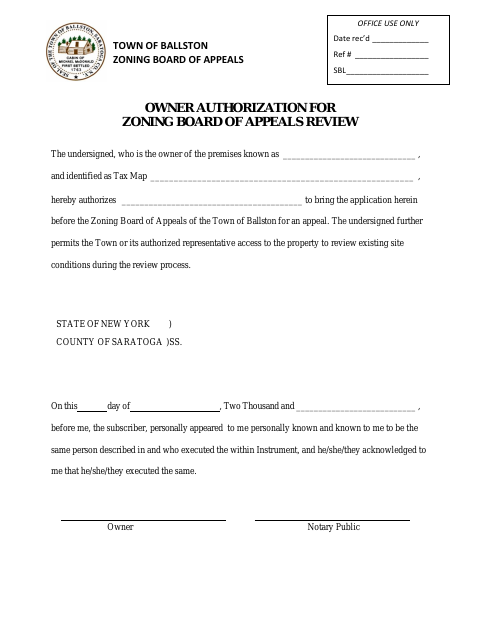
The property owner uses this form to authorize another person to bring an appeal application before the Town of Ballston Zoning Board of Appeals. It also permits the Town or its authorized representative to access the property to review existing site conditions during the review process. The form identifies the premises and tax map, and includes an owner signature and notarial acknowledgment.
Who needs it
A property owner who wants to authorize someone else to bring an appeal application before the Town of Ballston Zoning Board of Appeals needs this form.
Why it needs a notary
The owner signs before a notary, who completes the form’s acknowledgment stating that the signer appeared and acknowledged executing the instrument.
How to get this notarized
- 1
Download the Form
Get the Owner Authorization for Zoning Board of Appeals Review form from the Town of Ballston.
- 2
Fill In the Details
Enter the premises and tax map information and identify the person authorized to bring the appeal application.
- 3
Book an Online Notary
Arrange an online notarization with a commissioned online notary.
- 4
Sign on Video
Appear by video and acknowledge signing the form before the notary.
- 5
Submit to the Town
Send the completed form to the Town of Ballston for the zoning board review process.
Preview the form
The blank PDF straight from Ballston. Look it over, then upload your filled copy to start the notary session.

You’ll need ID and a webcam.
A licensed online notary will join you on video, verify your government-issued ID, witness your signature, and apply their seal. You’ll receive the notarized PDF by email when the session ends.
Frequently asked questions
- How do I complete this owner authorization?
- Enter the premises and tax map details, name the person authorized to bring the appeal application, then sign before a notary and submit the completed form to the Town.
- Do I need to sign this form before a notary?
- Yes. The form includes an acknowledgment for the owner, who must appear before a notary and acknowledge executing the instrument.
- Can I use online notarization for this form?
- New York authorizes remote online notarization by its notaries under Executive Law §135-c, effective since 2023. You can sign with a commissioned online notary.
- What property access does this form authorize?
- It permits the Town or its authorized representative to access the property to review existing site conditions during the review process. Confirm with the city, town or village if unsure.