
Port Jefferson, NY · Suffolk County
Rental Permit Registration Application
This application lets Port Jefferson property owners apply for or renew a rental permit and registration for a dwelling they operate as a rental within the village.
- licensed online notary
- ~15 min average
- Notarized PDF emailed
What you’ll need
- Government-issued photo ID
- Webcam-enabled device (laptop or phone)
- This form, ready to upload as a PDF
What this form is
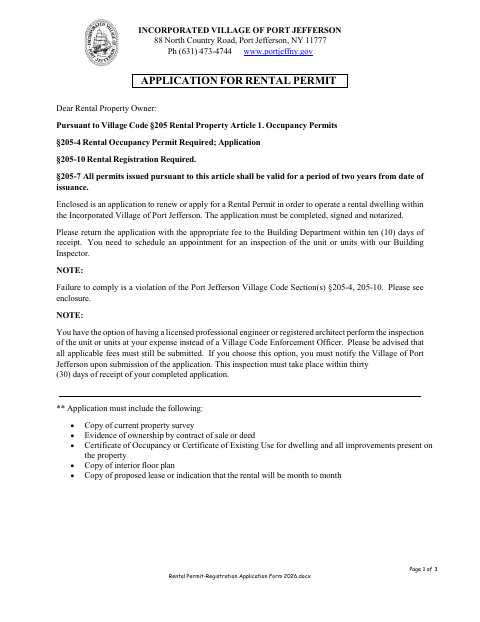
The application collects owner and rental-property details for a new or renewed rental permit and registration. Port Jefferson asks owners to complete, sign, and notarize it, return it with the applicable fee to the Building Department within ten days of receipt, and schedule an inspection. Applicants must also provide the listed supporting documents, including a property survey, ownership evidence, occupancy or existing-use certificate, interior floor plan, and proposed lease or month-to-month information.
Who needs it
Property owners applying for or renewing a permit to operate a rental dwelling within the Incorporated Village of Port Jefferson need to submit this application.
Why it needs a notary
The form provides a “Read and acknowledged” owner-signature block; the property owner must sign the application before a notary public.
How to get this notarized
- 1
Download the Application
Get the Rental Permit Registration Application from the Village of Port Jefferson.
- 2
Complete the Form
Fill in the owner and rental-property details and gather the supporting documents listed on the application.
- 3
Book an Online Notary
Schedule a remote session with a commissioned online notary for the owner signature.
- 4
Sign on Video
Sign the owner-signature section during the notary’s video session.
- 5
Submit to the Village
Return the notarized application, required documents, and applicable fee to the Building Department as directed.
Preview the form
The blank PDF straight from Port Jefferson. Look it over, then upload your filled copy to start the notary session.

You’ll need ID and a webcam.
A licensed online notary will join you on video, verify your government-issued ID, witness your signature, and apply their seal. You’ll receive the notarized PDF by email when the session ends.
Frequently asked questions
- How do I get the Port Jefferson rental application notarized online?
- Complete the application, then book a session with a commissioned online notary. Sign the owner-signature section during the video session and follow the Village’s instructions for submitting the notarized form.
- Do I need to include supporting documents with the application?
- Yes. The form lists a current property survey, ownership evidence, a Certificate of Occupancy or Certificate of Existing Use, an interior floor plan, and a proposed lease or month-to-month indication.
- Can I sign this application with a remote online notary?
- New York authorizes remote online notarization for its notaries under Executive Law §135-c. Real Property Law §299 recognizes notarial acts performed outside New York by an officer authorized where the act is performed.
- When should I contact the Village if I have questions about filing?
- Submit the application and applicable fee to the Building Department within ten days of receipt, as the form instructs. Confirm with the city, town or village if unsure about submission details.