
Kingston, NY · Ulster County
Rental Property De-Registration Form
The Rental Property De-Registration Form lets a property owner ask Kingston’s Department of Building Safety & Zoning Enforcement to remove a property from rental status.
- licensed online notary
- ~15 min average
- Notarized PDF emailed
What you’ll need
- Government-issued photo ID
- Webcam-enabled device (laptop or phone)
- This form, ready to upload as a PDF
What this form is
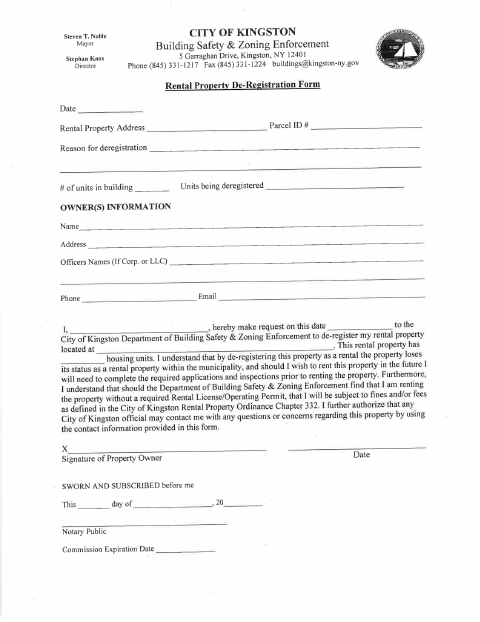
Owners use this form to request de-registration of a rental property with the City of Kingston Department of Building Safety & Zoning Enforcement. It records the property address, parcel, reason, units, and owner information, and explains that the property loses rental status after de-registration. The form also warns that renting again requires the required applications and inspections, and that renting without a required license or permit may result in fines or fees.
Who needs it
A property owner who wants the City of Kingston to de-register a rental property should complete and submit this form.
Why it needs a notary
The form includes a sworn-and-subscribed jurat; the property owner requesting de-registration signs and swears to the form before a notary.
How to get this notarized
- 1
Download the Form
Get the Rental Property De-Registration Form from the City of Kingston.
- 2
Fill In Property Details
Provide the property address, parcel, reason for de-registration, unit information, and owner contact details.
- 3
Book an Online Notary
Schedule a remote session with a commissioned online notary.
- 4
Sign on Video
Sign and swear to the form during the video session before the notary.
- 5
Submit to the City
Send the notarized form to Kingston’s Department of Building Safety & Zoning Enforcement.
Preview the form
The blank PDF straight from Kingston. Look it over, then upload your filled copy to start the notary session.

You’ll need ID and a webcam.
A licensed online notary will join you on video, verify your government-issued ID, witness your signature, and apply their seal. You’ll receive the notarized PDF by email when the session ends.
Frequently asked questions
- How do I get the Rental Property De-Registration Form notarized?
- Complete the form, then sign and swear to it before a commissioned online notary during a video session. Submit the notarized form to Kingston’s Department of Building Safety & Zoning Enforcement.
- Do I need to sign this form in front of a notary?
- Yes. The form includes a sworn-and-subscribed block for a notary, so the property owner should sign and swear to the form before the notary.
- Can I use a remote online notary for this form?
- New York authorizes remote online notarization by its own notaries. A commissioned online notary can notarize your signature remotely; confirm with the city, town or village if unsure.
- What happens after my rental property is de-registered?
- The form states that the property loses its rental status. If you want to rent it in the future, you will need to complete the required applications and inspections before renting.