
Mount Vernon, NY · Westchester County
Certificate of Tenancy Application
This application requests a Certificate of Tenancy for non-residential premises in Mount Vernon and is filed by the tenant or an authorized applicant with the City Department of Buildings.
- licensed online notary
- ~15 min average
- Notarized PDF emailed
What you’ll need
- Government-issued photo ID
- Webcam-enabled device (laptop or phone)
- This form, ready to upload as a PDF
What this form is
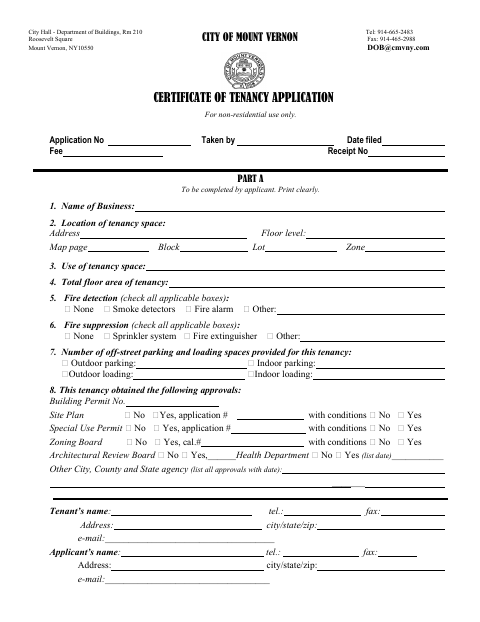
Mount Vernon’s Department of Buildings uses this application to review the proposed non-residential tenancy, including the space’s use, floor area, safety features, parking, approvals, and floor-by-floor details. The applicant completes Parts A, B, and C; Part B is an affidavit about the applicant’s authority and the truth of the application. The form lists supporting materials, fees, and inspections required for submission and approval.
Who needs it
A tenant or authorized applicant seeking a Certificate of Tenancy for non-residential premises in Mount Vernon must complete and file the application with the Department of Buildings.
How to get this notarized
- 1
Download The Application
Get the Certificate of Tenancy Application from the City of Mount Vernon.
- 2
Complete The Application
Fill out Parts A, B, and C as applicable, and gather the supporting documents listed on the form.
- 3
Book An Online Notary
Schedule an online appointment to notarize the Applicant’s Affidavit in Part B.
- 4
Sign On Video
Sign the affidavit during the live video session with a commissioned online notary.
- 5
Submit To The City
Submit the completed application and required supporting items to the Mount Vernon Department of Buildings.
Preview the form
The blank PDF straight from Mount Vernon. Look it over, then upload your filled copy to start the notary session.

You’ll need ID and a webcam.
A licensed online notary will join you on video, verify your government-issued ID, witness your signature, and apply their seal. You’ll receive the notarized PDF by email when the session ends.
Frequently asked questions
- How do I get the Applicant’s Affidavit notarized?
- Complete the affidavit and book an online appointment. Sign Part B during a live video session with a commissioned online notary, then include it with the application.
- Do I need to submit other documents with this application?
- The form lists a lease copy, and, if the applicant is not the tenant, a notarized authorization letter or legal proof of authority. It also lists plans, fees, and inspections that may apply.
- Can I use online notarization for this form?
- New York authorizes its own notaries to perform remote online notarizations under Executive Law §135-c, effective in 2023. Check with the Department of Buildings about its submission requirements.
- What if I am unsure whether this notarized form will be accepted?
- Ask the Mount Vernon Department of Buildings about its submission requirements; confirm with the city, town or village if unsure.
Other forms in Mount Vernon
Building Permit Amendment Application
Mount Vernon
Building Permit Application and Contractor Information Form
Mount Vernon
Demolition Permit Application
Mount Vernon
Owner's Electrical Affidavit
Mount Vernon
Reapportionment and Subdivision Application
Mount Vernon
Zoning Board Affidavit of Mailing
Mount Vernon