
Hobgood, NC · Halifax County
Application for an Administrative Hearing
This three-page application lets a property owner or applicant ask the Town of Hobgood Board of Adjustment to review a zoning decision or interpret the zoning map or ordinance.
- licensed online notary
- ~15 min average
- Notarized PDF emailed
What you’ll need
- Government-issued photo ID
- Webcam-enabled device (laptop or phone)
- This form, ready to upload as a PDF
What this form is
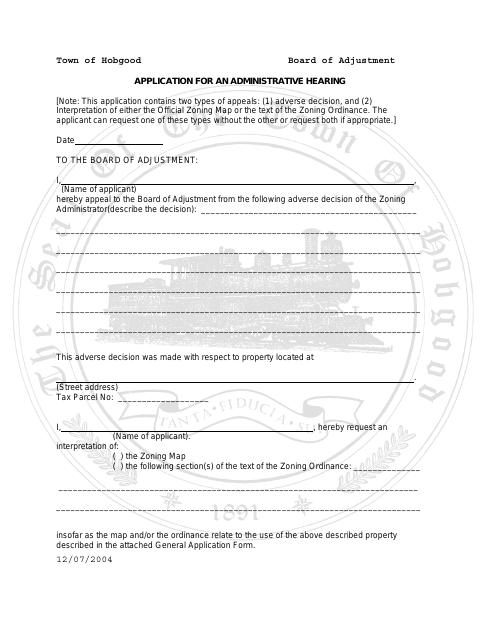
Use this application to appeal an adverse decision by the Zoning Administrator, request an interpretation of the Zoning Map or Zoning Ordinance, or seek both types of review. The form asks for the property address, tax parcel number, the decision or interpretation at issue, and the applicant’s explanation and supporting facts. If the applicant is not the owner and lacks a binding purchase option, the property owner must complete the attached authorization.
Who needs it
An applicant seeking Board of Adjustment review of a Zoning Administrator decision or zoning interpretation uses this form; a non-owner without a binding purchase option needs the owner’s authorization.
Why it needs a notary
The attached owner authorization has a “Sworn to and subscribed before me” jurat; the property owner signing that authorization must appear before the notary.
How to get this notarized
- 1
Download the Application
Get the Town of Hobgood Board of Adjustment Application for an Administrative Hearing.
- 2
Complete the Application
Describe the appeal or interpretation requested, identify the property, and provide your explanation and supporting facts.
- 3
Arrange an Online Notary
If owner authorization is required, book a commissioned online notary for the property owner’s sworn signature.
- 4
Sign Before the Notary
The property owner signs the authorization during the notarial session and completes the jurat.
- 5
Submit to the Town
Submit the completed application and any required owner authorization to the Town of Hobgood.
Preview the form
The blank PDF straight from Hobgood. Look it over, then upload your filled copy to start the notary session.

You’ll need ID and a webcam.
A licensed online notary will join you on video, verify your government-issued ID, witness your signature, and apply their seal. You’ll receive the notarized PDF by email when the session ends.
Frequently asked questions
- How do I complete the owner authorization?
- If you are not the property owner and do not have a binding option to purchase, the owner completes the attached authorization and signs its sworn statement before a notary.
- Do I need to notarize the applicant’s signature?
- The form’s notary block is on the owner authorization. It does not show a notary block for the applicant’s signature on the application.
- Can I use an online notary for this form?
- North Carolina’s own remote electronic notarization program has not launched. Its emergency video notarization requires both signer and notary to be in North Carolina. Ask the town whether it accepts your notarized form; confirm with the city or town if unsure.
- What information should I include in the application?
- Provide the property address and tax parcel number, describe the zoning decision or interpretation requested, and explain your interpretation and the facts you are prepared to present to the Board.