
Waynesville, NC · Haywood County
Floodplain Development Permit Application
This application requests a permit for development in a floodplain and is filed with Waynesville by property owners or applicants proposing work in a Special Flood Hazard Area.
- licensed online notary
- ~15 min average
- Notarized PDF emailed
What you’ll need
- Government-issued photo ID
- Webcam-enabled device (laptop or phone)
- This form, ready to upload as a PDF
What this form is
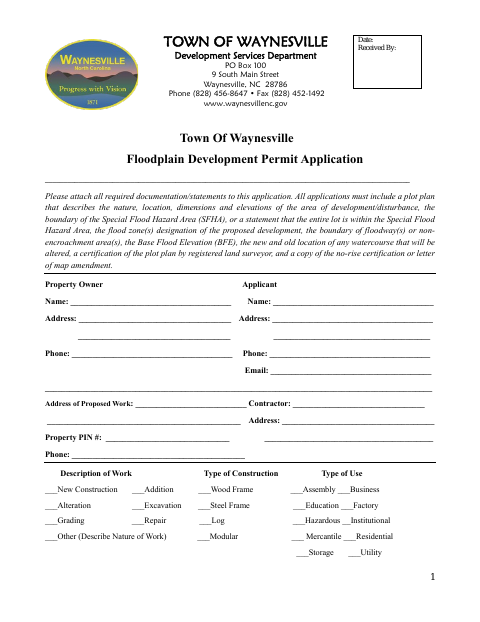
Waynesville’s application collects property, applicant, contractor, and proposed-work details for development in a floodplain. Applicants must attach a plot plan and other required materials; applications for work on existing buildings in Special Flood Hazard Areas may also require photographs, cost estimates, elevation information, and owner and contractor affidavits. The city uses the submitted information to review the work and determine whether floodplain requirements apply.
Who needs it
Property owners or applicants proposing development in a floodplain in Waynesville need to submit this application with the required plans and supporting documents.
Why it needs a notary
This form includes sworn-to-and-subscribed-before-me jurats on the Owner’s and Contractor’s Affidavits; each affidavit signer signs before the notary.
How to get this notarized
- 1
Download The Application
Get the Floodplain Development Permit Application and review its required plot plan, supporting documents, and affidavit pages.
- 2
Complete The Application
Enter the property, applicant, contractor, and proposed-work information, and prepare the required attachments.
- 3
Book An Online Notary
Arrange an appointment with a commissioned online notary for the affidavit or affidavits you need notarized.
- 4
Sign On Video
Sign each applicable affidavit during your notary appointment when instructed.
- 5
Submit To The City
Send the signed application and required attachments to the Town of Waynesville Development Services Department.
Preview the form
The blank PDF straight from Waynesville. Look it over, then upload your filled copy to start the notary session.

You’ll need ID and a webcam.
A licensed online notary will join you on video, verify your government-issued ID, witness your signature, and apply their seal. You’ll receive the notarized PDF by email when the session ends.
Frequently asked questions
- Which parts of the application need notarization?
- The Owner’s Affidavit and Contractor’s Affidavit each include a sworn-to-and-subscribed-before-me jurat, notary signature line, seal space, and commission-expiration line.
- How do I prepare the affidavits for notarization?
- Complete the applicable affidavit details, but wait to sign until your notary instructs you. Bring valid identification and have the required documents ready for your appointment.
- Do I need to notarize both affidavits?
- The form includes notarization blocks for both affidavits. If both the owner and contractor are completing their respective affidavits, each signer should sign before a notary.
- Can I use online notarization for this form?
- Rush Notary can connect you with a commissioned online notary. North Carolina’s own remote electronic notarization program has not launched; its emergency video notarization is separate and requires the signer and notary to be inside North Carolina. Confirm acceptance with the city.
- Where do I submit the completed application?
- The form identifies the Town of Waynesville Development Services Department as the recipient. Submit the completed application and required attachments there; confirm with the city or town if unsure.
Other forms in Waynesville
Floodplain Development Permit Application in other North Carolina cities
Each city publishes its own version of this form. Pick the city where you’re filing.