
Waynesville, NC · Haywood County
Subcontractor Affidavit
This affidavit identifies a subcontractor, the trade being performed, and the job site for Town of Waynesville building inspections records.
- licensed online notary
- ~15 min average
- Notarized PDF emailed
What you’ll need
- Government-issued photo ID
- Webcam-enabled device (laptop or phone)
- This form, ready to upload as a PDF
What this form is
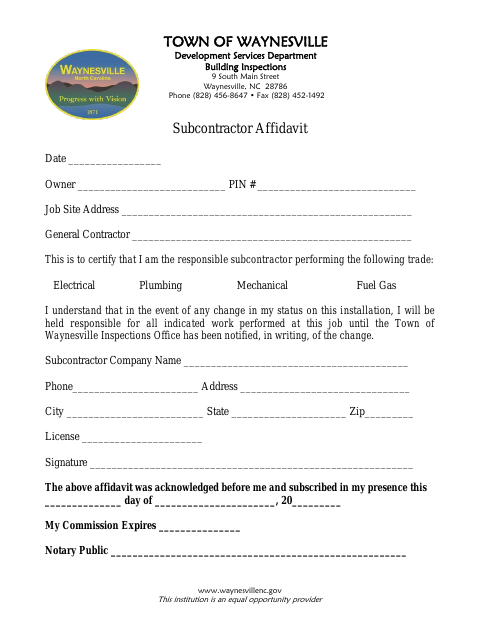
The Subcontractor Affidavit identifies the property owner, job site, general contractor, subcontractor company, and the trade the subcontractor is performing: electrical, plumbing, mechanical, or fuel gas. The subcontractor also states that they are responsible for the indicated work until the Town of Waynesville Inspections Office receives written notice of a change in status. Use it for a job when the Town's Building Inspections Department requests this affidavit.
Who needs it
A subcontractor performing electrical, plumbing, mechanical, or fuel gas work who has been asked to provide this affidavit for a Waynesville job site needs it.
Why it needs a notary
The form carries an acknowledgment-and-subscription block; the subcontractor signing the affidavit must acknowledge and sign in the notary’s presence.
How to get this notarized
- 1
Download the Affidavit
Get the Subcontractor Affidavit from the Town of Waynesville.
- 2
Fill In the Form
Enter the job, owner, general contractor, trade, and subcontractor information.
- 3
Book an Online Notary
Arrange a session with a commissioned online notary, after confirming the Town will accept online notarization.
- 4
Sign on Video
Sign and acknowledge the affidavit during the notary session.
- 5
Submit to the Town
Send the completed affidavit to the Town of Waynesville as directed by Building Inspections.
Preview the form
The blank PDF straight from Waynesville. Look it over, then upload your filled copy to start the notary session.

You’ll need ID and a webcam.
A licensed online notary will join you on video, verify your government-issued ID, witness your signature, and apply their seal. You’ll receive the notarized PDF by email when the session ends.
Frequently asked questions
- How do I complete the Subcontractor Affidavit?
- Fill in the owner, PIN, job site, general contractor, trade, and subcontractor details. Sign before the notary, then submit the completed form to the Town as directed.
- Do I need to sign this affidavit in front of a notary?
- Yes. The form includes an acknowledgment and subscription stating that it was acknowledged before a notary and signed in the notary’s presence.
- Can I use a commissioned online notary for this form?
- North Carolina’s enacted remote electronic notarization program has not launched. Ask the Town whether it will accept this form notarized online; confirm with the city or town if unsure.
- What should I do if my subcontractor status changes?
- The affidavit says you remain responsible for the indicated work until the Town of Waynesville Inspections Office has been notified of the change in writing.