
Charlotte, NC · Mecklenburg County
Owner’s Verification of Occupancy
This form authorizes an individual or company to use a property for specified zoning activities, and the legal owner or occupant/agent submits it with a permit application.
- licensed online notary
- ~15 min average
- Notarized PDF emailed
What you’ll need
- Government-issued photo ID
- Webcam-enabled device (laptop or phone)
- This form, ready to upload as a PDF
What this form is
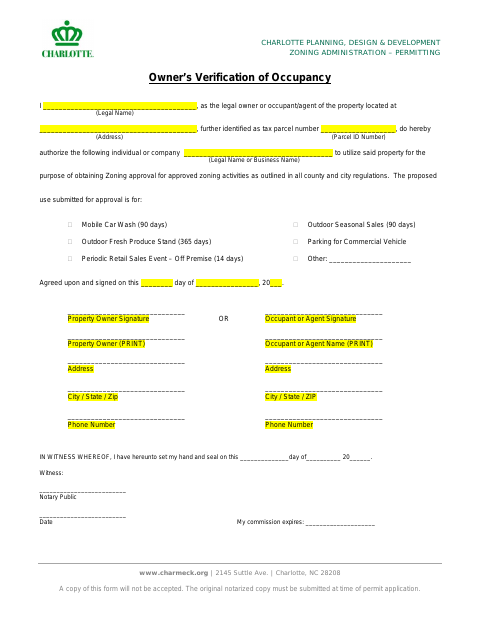
The form identifies the property, its owner or occupant/agent, the authorized individual or company, and the proposed use for zoning approval. Charlotte requires the original notarized form at the time of permit application; a copy will not be accepted. The listed uses include mobile car washes, seasonal sales, produce stands, commercial vehicle parking, and periodic retail sales events, with space for another use.
Who needs it
A property owner or occupant/agent who authorizes an individual or company to use the property for zoning approval activities must complete and submit this form.
Why it needs a notary
The form has an “IN WITNESS WHEREOF” notary block with witness, notary, date, and commission-expiration lines; the owner or occupant/agent signs the authorization.
How to get this notarized
- 1
Download the Form
Get the Owner’s Verification of Occupancy form from Charlotte’s permitting forms.
- 2
Fill In the Details
Enter the property owner or occupant/agent, property address and parcel ID, authorized person or company, and proposed use.
- 3
Book an Online Notary
Arrange a session with a commissioned online notary and check whether the city accepts the resulting notarized original.
- 4
Sign on Video
Follow the notary’s instructions to sign the form during your video session.
- 5
Submit to the City
Submit the original notarized form with your permit application; the form says copies are not accepted.
Preview the form
The blank PDF straight from Charlotte. Look it over, then upload your filled copy to start the notary session.

You’ll need ID and a webcam.
A licensed online notary will join you on video, verify your government-issued ID, witness your signature, and apply their seal. You’ll receive the notarized PDF by email when the session ends.
Frequently asked questions
- How do I submit the Owner’s Verification of Occupancy?
- Complete the form, have the required signature notarized, and submit the original with your permit application. The form says copies will not be accepted.
- Do I need to submit the original notarized form?
- Yes. The form states that the original notarized copy must be submitted at the time of permit application and that a copy will not be accepted.
- Can I use an online notary for this form?
- North Carolina’s remote electronic notarization program has not launched. Rush Notary can help you connect with a commissioned online notary; confirm acceptance of the notarized original with the city or town if unsure.
- Who signs the authorization?
- The form provides signature lines for the property owner or the occupant/agent. The person authorizing the proposed use should complete the applicable signature line and notary block.