
Winterville, NC · Pitt County
Public Comment Application
Winterville residents and other applicants use this application to request an opportunity for a named speaker to address the Town Council.
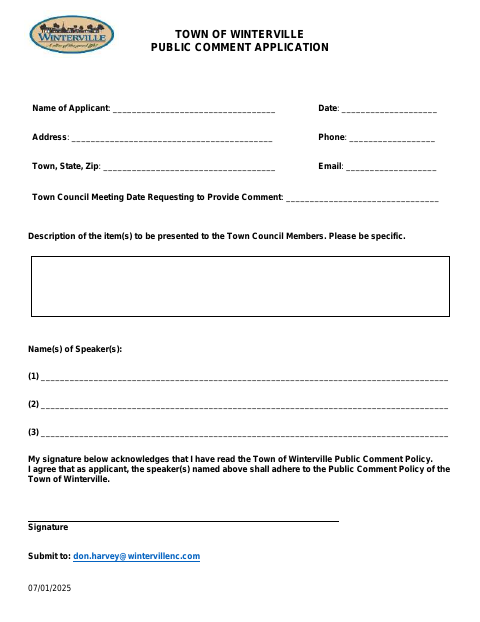
What this form is
This application lets an applicant request time for one or more named speakers to address the Winterville Town Council and acknowledge the Town’s Public Comment Policy. It asks for the topic, speaker and applicant contact details, the requested meeting date, and the applicant’s signature and date. The attached policy explains the public comment registration process and speaking rules.
Who needs it
An applicant requesting that a speaker address the Winterville Town Council during its public comment period should complete this application.
How to submit it
Email the completed application to [email protected], the submission address printed on the form; the policy also describes registering with the Town Clerk.
About notarization
This application is signed and dated without a notary; the policy describes no notarized or sworn attachment, so the applicant simply signs and dates it.
How to submit this form
- 1
Download The Application
Download the Public Comment Application PDF.
- 2
Complete The Application
Fill in the topic, speaker names, applicant contact information, and requested Town Council meeting date; sign and date the form.
- 3
Gather Attachments
The document does not list any required attachments.
- 4
Submit To The Town
Email the completed application to [email protected].
Frequently asked questions
- What is the Winterville Public Comment Application for?
- It lets an applicant request an opportunity for named speakers to address the Town Council and acknowledge the Town’s Public Comment Policy.
- What information does the application ask for?
- It asks for the item or topic, speaker names, applicant contact details, the requested Town Council meeting date, and the applicant’s signature and date.
- Do I need a notary for the Public Comment Application?
- No. The application is signed and dated without a notary, and the policy describes no notarized or sworn attachment.
- How do I submit the Public Comment Application?
- Email the completed application to [email protected], the address printed on the form. The policy also describes registering with the Town Clerk.
Need something notarized?
This Public Comment Application doesn’t need a notary — but if you have another Winterville form that does, a commissioned online notary can help.