
Rolesville, NC · Wake County
Affidavit of Workers’ Compensation Coverage
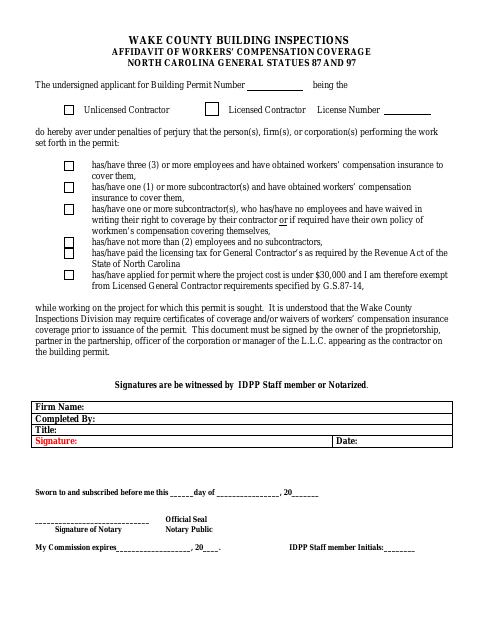
This affidavit documents a contractor’s workers’ compensation coverage or applicable exemption for a building permit, and is completed by the owner or authorized representative of the contracting business.
- licensed online notary
- ~15 min average
- Notarized PDF emailed
What you’ll need
- Government-issued photo ID
- Webcam-enabled device (laptop or phone)
- This form, ready to upload as a PDF
What this form is
This affidavit records the workers’ compensation coverage or exemption status of the people and businesses performing work under a building permit. The applicant completes it for a permit application, and the form says Wake County Inspections may request insurance certificates or coverage waivers before issuing the permit.
Who needs it
A building-permit applicant whose business appears as the contractor must have its proprietorship owner, partnership partner, corporate officer, or LLC manager complete and sign the affidavit.
Why it needs a notary
The form has a sworn-to-and-subscribed jurat, and the contractor’s proprietorship owner, partnership partner, corporate officer, or LLC manager signs before the notary.
How to get this notarized
- 1
Download the Affidavit
Download the one-page workers’ compensation coverage affidavit for your building-permit application.
- 2
Complete the Form
Enter the permit and firm information, and identify the coverage or exemption statement that applies.
- 3
Book an Online Notary
Arrange an appointment with a commissioned online notary and confirm the permitting office accepts this notarization option.
- 4
Sign Before the Notary
The business owner or authorized representative signs the affidavit as directed in the notary’s presence.
- 5
Submit With Your Permit Application
Submit the completed affidavit to Wake County Building Inspections with your building-permit materials.
Preview the form
The blank PDF straight from Rolesville. Look it over, then upload your filled copy to start the notary session.

You’ll need ID and a webcam.
A licensed online notary will join you on video, verify your government-issued ID, witness your signature, and apply their seal. You’ll receive the notarized PDF by email when the session ends.
Frequently asked questions
- How do I complete the workers’ compensation affidavit?
- Enter the permit and business details, select the applicable coverage or exemption statement, and have the required business owner or representative sign before a notary or IDPP staff member.
- Do I need to notarize this form?
- The form says signatures must be witnessed by an IDPP staff member or notarized. Check with Wake County Building Inspections about the option accepted for your permit.
- Can I sign this form with an online notary?
- North Carolina’s enacted remote electronic notarization program has not launched. Emergency video notarization requires the signer and notary to be in North Carolina. Confirm acceptance of a commissioned online notary with the permitting office.
- Where do I submit the completed affidavit?
- The form identifies Wake County Inspections Division and says coverage certificates or waivers may be required before permit issuance. Confirm submission instructions with the permitting office; confirm with the city or town if unsure.
Other forms in Rolesville
Affidavit of Workers’ Compensation Coverage in other Wake County cities
Each city publishes its own version of this form. Pick the city where you’re filing.