
Dayton, OH · Montgomery County
Board of Zoning Appeals Application Cover Page
This notarized cover page identifies the property, applicant, and requested zoning relief for people submitting an application to Dayton’s Board of Zoning Appeals.
- licensed online notary
- ~15 min average
- Notarized PDF emailed
What you’ll need
- Government-issued photo ID
- Webcam-enabled device (laptop or phone)
- This form, ready to upload as a PDF
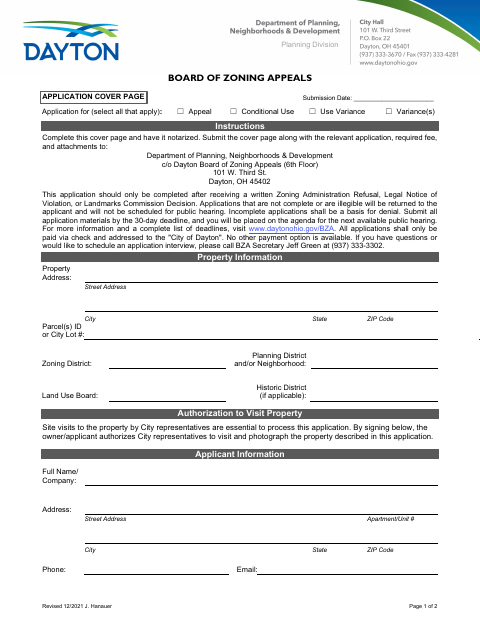
What this form is
Complete this cover page only after receiving a written Zoning Administration Refusal, Legal Notice of Violation, or Landmarks Commission Decision. Submit it with the relevant application, required fee, and attachments to the Dayton Board of Zoning Appeals; incomplete or illegible applications may be returned or denied. The form also authorizes City representatives to visit and photograph the property, and the city states that applications must meet its 30-day deadline.
Who needs it
Applicants seeking an appeal, conditional use, use variance, or variance from Dayton’s Board of Zoning Appeals after receiving one of the listed written decisions or notices need this cover page.
Why it needs a notary
The applicant signs the statement under the jurat reading “Subscribed and sworn before me,” affirming that the statements and accompanying exhibits are true.
How to get this notarized
- 1
Download the Cover Page
Get the Board of Zoning Appeals Application Cover Page from Dayton’s official document page.
- 2
Complete the Form
Enter the property and applicant details, select the requested application type, and review the form instructions.
- 3
Book an Online Notary
Schedule a video appointment with a commissioned online notary before signing the applicant statement.
- 4
Sign on Video
Sign the applicant statement during the online notarization; the notary completes the jurat.
- 5
Submit to the City
Send the notarized cover page with the relevant application, required fee, and attachments to Dayton’s Board of Zoning Appeals.
Preview the form
The blank PDF straight from Dayton. Look it over, then upload your filled copy to start the notary session.

You’ll need ID and a webcam.
A licensed online notary will join you on video, verify your government-issued ID, witness your signature, and apply their seal. You’ll receive the notarized PDF by email when the session ends.
Frequently asked questions
- How do I get the Dayton zoning appeals cover page notarized?
- Complete the form, then sign its applicant statement during a video session with a commissioned online notary. Submit the notarized cover page with the relevant application, required fee, and attachments to the city.
- Do I need to notarize this cover page?
- Yes. The form instructs applicants to have the cover page notarized and includes a jurat stating that the applicant’s statements and submitted exhibits are true.
- Can I use online notarization for this Dayton application?
- Ohio law authorizes its notaries to perform online notarizations under R.C. §§147.60–147.66. The form does not specify an online submission process; confirm with the city or village if unsure.